PCSX2 Controller Setup: Step-by-Step Guide in 2023 - Gaming News google.com, pub-1884294887586162, DIRECT, f08c47fec0942fa0
Gaming News
No Result
View All Result
  • Home
  • PC
  • PlayStation
  • Xbox
  • Nintendo
  • Crypto Gaming
  • Reviews
  • Metaverse
  • Videos
  • Home
  • PC
  • PlayStation
  • Xbox
  • Nintendo
  • Crypto Gaming
  • Reviews
  • Metaverse
  • Videos
No Result
View All Result
Gaming News
No Result
View All Result

PCSX2 Controller Setup: Step-by-Step Guide in 2023

September 10, 2023
in Nintendo
0 0
0
10
VIEWS
Share on FacebookShare on Twitter


If you’re a fan of the PS2 and looking to play games on the PCSX2 emulator using a game controller or gamepad, setting up the controller on PCSX2 can be a bit complicated for first-timers. This guide will cover the PCSX2 controller setup process and show you how to get ready to play your favorite PS2 games in no time.

The PCSX2 emulator is one of the best PS2 emulators you can use. Sure, you can play your games with a keyboard and mouse if you wish, but there’s a certain level of immersion that you can only get by playing them as originally intended with a gamepad.

You’ll only need one controller to get started. Enough of an introduction, let’s get into it!

How To Set Up A PCSX2 Controller?

Setting up a controller to use with PCSX2 can be done in just a few simple steps. Follow along below to get started.

To get started, follow the initial instructions below before moving on.

  • Open the PCSX2 emulator
  • Go to Config > Controllers (PAD) and then click on Plugin Settings…
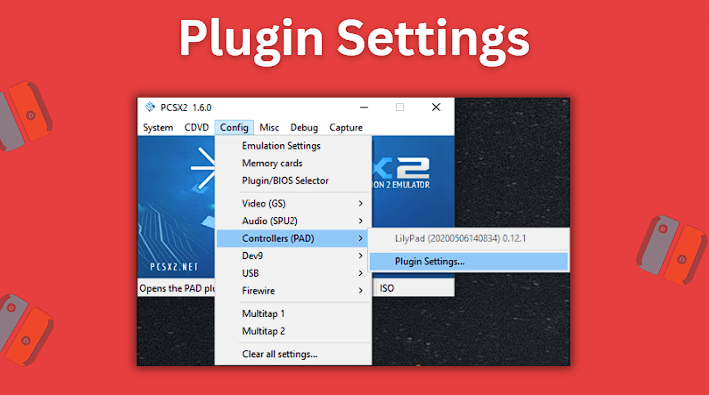
Go to Config > Controllers (PAD) and then click on Plugin Settings…
  • Apply the following settings shown in the screenshot below and then click the Apply and the OK buttons to save the settings
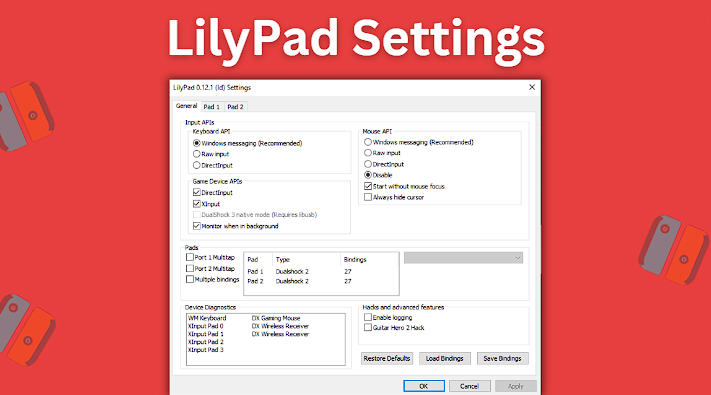
Apply the following settings shown in the screenshot below and then click the Apply and the OK buttons to save the settings
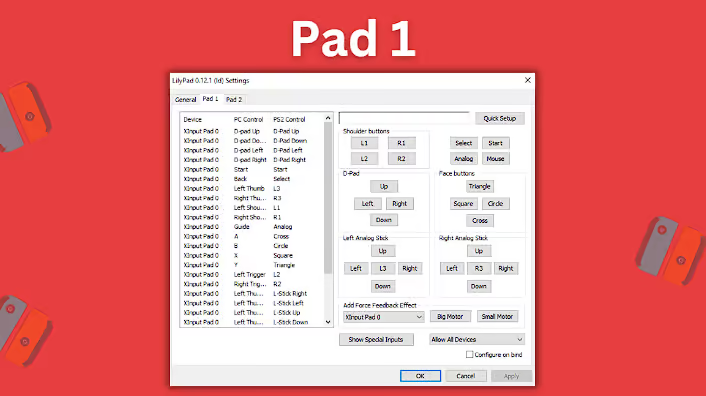
  • Click on the Pad 1 tab at the top
Click on the Pad 1 tab at the top
  • Next, click on the Quick Setup button and then press down all the buttons on your controller to have them all recognized by the emulator
  • Click the Apply button and then click on the OK button to update the controller mapping settings
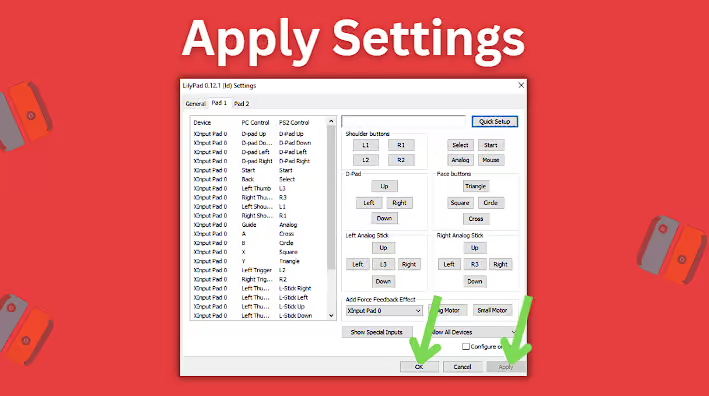
Click the Apply button and then click on the OK button to update the controller mapping settings
  • Now start up a PS2 game and make sure the emulator recognizes the controller you just configured
  • You should now be good to go and ready to play your PS2 games using a controller

Summary

Setting up a controller to use with the PCSX2 emulator is pretty straightforward as long as you know the steps to take. If you have any issues and your controller isn’t recognized, carefully follow the steps again to ensure that you didn’t miss anything. You’ll want to be sure that when you press down the controller’s button to map them to the emulator’s key configuration and that they’re recognized before clicking to apply the changes.

Also be sure to check out our guide for settings up the RetroArch PS2 Core PCSX2.

Frequently Asked Questions

How to Set Up a PS2 Controller Emulator for PCSX2 on PC

The guide above explains the process step-by-step, but essentially configuring a controller with PCSX2 really just comes down to connecting the controller to your PC, mapping its buttons to the emulator’s keybindings, saving the changes, and then starting up a game.

What Is the Best PCSX2 Controller Plugin to Use?

LilyPad is the most commonly used controller plugin for PCSX2. These days, LilyPad comes preinstalled with the emulator and you can access it by going to the Config menu, selecting the Controllers (Pad) option, and then Plugin Settings.

LilyPad supports multiple different inputs including a keyboard and mouse, an Xbox 360 controller, PS2 and PS3 controllers, and many other 3rd controllers.

Why Is My PCSX2 Controller Setup Not Working?

There could be several reasons why your PCSX2 controller setup isn’t working correctly:

  • Incorrect configuration of the controller plugin or PCSX2 settings
  • Compatibility issues with your controller or PC
  • Outdated drivers or software
  • Hardware problems with your controller or PC
  • You didn’t properly map the controller buttons to the emulator’s keybindings

Try troubleshooting the issue using the steps above in our guide to ensure you followed the steps correctly.

Where Can I Download the LilyPad Controller Plugin for PCSX2?

These days, the latest versions of the PCSX2 emulator come with the LilyPad controller plugin included by default. All you need to do is install the PCSX2 emulator from the official website here and you should be good to go.



Source link

Previous Post

SHINCHAN AND FRANKLIN TRIED IMPOSSIBLE PARKOUR CHALLENGE GTA 5

Next Post

Tower of God Season 2 Release Date, Trailer, Plot, Cast, and Latest News

Next Post
Tower of God Season 2 Release Date, Trailer, Plot, Cast, and Latest News

Tower of God Season 2 Release Date, Trailer, Plot, Cast, and Latest News

Recommended

Mastering bankroll budgeting for a profitable on line casino expertise

April 16, 2026

Mastering your gaming funds A information to efficient bankroll budgeting

April 16, 2026

How On line casino VIP Tiers Unlock Unique Perks and Unique Benefits

April 16, 2026

Santastic bonus deposit 200 Santa!

April 16, 2026

Gaming News

Get latest Gaming News on Pley2win.com. Popular Games, New released, Gaming Review, Xbox gaming, PlayStation, PC, Mobile Gaming and More!!

Categories

  • ! Без рубрики
  • 1
  • 10
  • 1000A Z
  • 1090A Z
  • 111
  • 18.12.1
  • 1win-np.com
  • 1xbetapp-ph.com3
  • 2000A Z
  • 44
  • 50%A 50 Z
  • 50%A 50B Z
  • 777casino
  • 8
  • 800A 200BA Z
  • adobe generative ai 3
  • adobe generative ai 8
  • bahisyasal 4521
  • Blog
  • Bookkeeping
  • BT prod 5715
  • Business, Small Business
  • Casino
  • casinocatspins
  • casinopinco
  • casinowazamba
  • catspinscasino
  • Chicken Road rules
  • chickenroad
  • cresuscasino
  • Crypto Gaming
  • dec_bh_common
  • dec_bh_main
  • dec_pb_common
  • December
  • dushscience.in
  • edeka-halmschlag.de
  • Efbet Jackpots
  • Featured News
  • FinTech
  • Forex News
  • Forex Trading
  • Games
  • Gaming News
  • generative ai adobe photoshop 3
  • ghostinocasino
  • giochi
  • gokspel
  • impressariocasino
  • jan4
  • jeux
  • jeuxi
  • Leon Casino
  • lobby303sky.info
  • madnixcasino
  • Metaverse
  • mostbet
  • NEW
  • New Released
  • News
  • ninecasino
  • Nintendo
  • nko-zdrav.ru
  • nov2
  • nov6
  • novos-casinos
  • Online Casino
  • online καζίνο
  • PC
  • pinco
  • platinumslotscasino
  • PlayStation
  • Plinko Online Casino
  • Popular
  • Post
  • Public
  • ready_text
  • Reviews
  • rubds1010.ru 10
  • sep
  • Sex
  • Sober living
  • spel
  • Spellen
  • spiderbetscasino
  • Spiele
  • spiller1
  • tenexcasino
  • test
  • Trading
  • trends
  • Uncategorized
  • Videos
  • voxcasino
  • vrclub-tron.ru 10
  • vulkanvegascasino
  • what to name your ai
  • wildz
  • wildzcasino
  • www.xin-chao.de
  • Xbox
  • zuplay-in.com2
  • Новости Криптовалют
  • Финтех
  • Форекс Брокеры56

Follow us

  • Home
  • DMCA
  • Disclaimer
  • Privacy Policy
  • Cookie Privacy Policy
  • Terms and Conditions
  • Contact Us

Copyright © 2022 - Pley 2 Win.

No Result
View All Result
  • Home
  • PC
  • PlayStation
  • Xbox
  • Nintendo
  • Crypto Gaming
  • Reviews
  • Metaverse
  • Videos

Copyright © 2022 - Pley 2 Win.

Welcome Back!

Login to your account below

Forgotten Password? Sign Up

Create New Account!

Fill the forms below to register

All fields are required. Log In

Retrieve your password

Please enter your username or email address to reset your password.

Log In
This website uses cookies. By continuing to use this website you are giving consent to cookies being used. Visit our Privacy and Cookie Policy.