Sims 4, the latest reiteration of the game, is versatile and diverse. What makes the game stand out is its intrinsic features, some of which are unknown to the players.
When you are trapping through Sims 4, trying to make the most out of the game, you unknowingly miss out on quite a big. This is where the “debug cheat” comes into play. The primary purpose behind this cheat is to unlock and show hidden objects in Sims 4.
We have laid out all the information in this guide if you want to learn more about the “show hidden objects in Sims 4” feature.
Also Read – The Ultimate Sims 4 Cooking Skill Cheat Sheet
What are the Debug or Hidden Items in Sims 4?
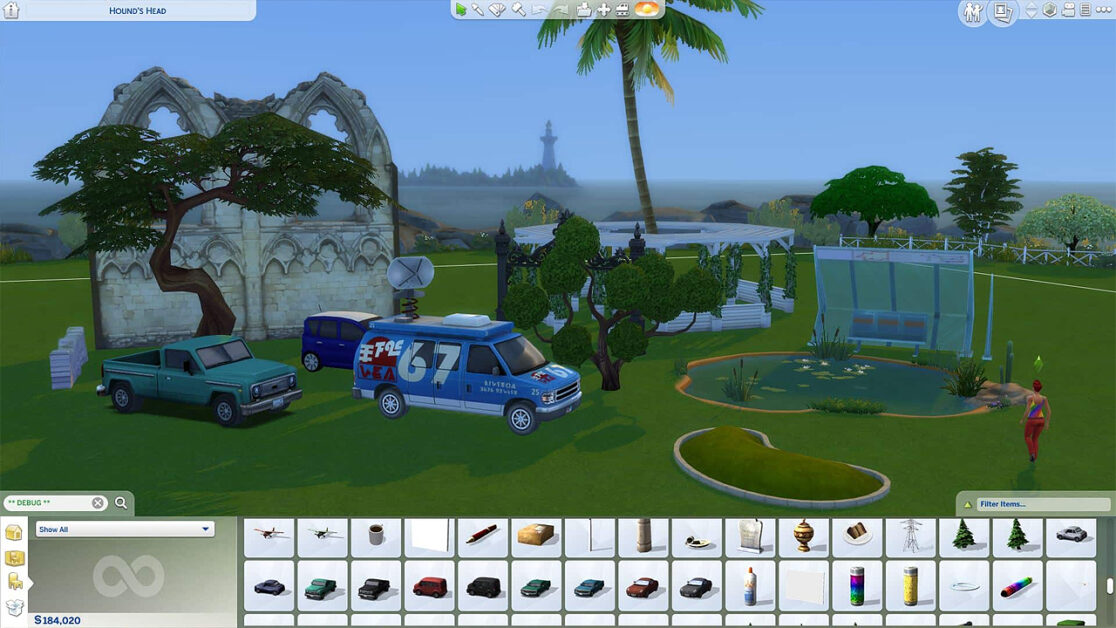
As a beginner player, knowing very little about the debug or hidden items in Sims 4 is common. Don’t worry, though, because we will break down the basics for you first.
Debug/hidden items in The Sims 4 are objects not ordinarily available in the game’s build mode. These are the items that the developers access to test out the game and later create custom content from it.
If you aren’t a developer, another way to access them is by using cheats in Sims 4. When it comes to classifying the debug or hidden items in Sims 4, there are two categories that one needs to pay close attention to:
Buy debug mode objects – These include the playable things that the players can use to decorate their Sims’ home or their surroundings. These items include trees, rocks, collectibles, bushes, etc.
Live Edit mode – The second category of debug items in Sims 4 are the ones that the players can use to modify the look and feel of their surroundings. Some things in that category include foliage, props, tools, etc.
Irrespective of the type of debug item that you are trying to access in Sims 4, you must enable the cheats inside the game first.
Also Read – Sims 4 House Layouts – Top Realistic Sims Dream Houses
How Can One Unveil the Hidden Objects in Sims 4 on PC?
Now that you have a basic understanding of the hidden objects in Sims 4 and what they signify, we must understand how to unveil those items.
To access those hidden items, you must enable the cheats first. This is what you need to do on PC first:
- Press Ctrl + Shift + C.
- This will open the cheats dialogue box; type “testingcheats true,” then Enter.
- Once you enter that, a message stating that the cheats are enabled will pop up.
Once the cheats are enabled in Sims 4, you can enter the debug cheat in the designated cheat box to access the cheats without any hassle.
Follow the steps mentioned:
- In the cheat dialogue box, type bb.showhiddenobjects and then press Enter.
- If you want to access the live edit option, the code for that is bb.showliveeditobjects, and then press Enter again.
- You can exit the cheats menu accordingly once you have entered the relevant codes.
Following enabling the relevant cheat codes, you should be able to view the hidden items and the debug items sorted out.
How Can One Unveil the Hidden Objects in Sims 4 on the Gaming Consoles?
If you play Sims 4 on your gaming console instead of a PC, the following are the steps that you need to follow:
- On PlayStation, press L1 + L2 + R1 + R2. On Xbox, press LB + LT + RB + RT.
- Next, you have to enter “testingcheats true”.
- On PlayStation, press X or Xbox, and press A.
- From the menu, find and press OK.
Following the steps, you should be able to enable the cheats option on your gaming consoles.
Once the cheats are enabled, you then have to follow the steps mentioned to unveil the debug codes:
- Start by entering bb.showhiddenobjects and then type A if you are using an Xbox and type X if you are using PlayStation.
- Next, enter bb.showliveeditobjects, type A if you are using an Xbox, and type X if you are using PlayStation.
Once you have entered the relevant cheats, you can exit the cheats menu from there.
Irrespective of whether you are playing on a PC or a gaming console, you can go ahead and view the objects by functint in the menu.
For that, you have to follow Filters > Content > Unknown. Doing so will show you all the debug items one after the other. From the catalog, you can check all the regular items from there.
What’s great about accessing the debug items is that it enables you to build new items with optimal customization.
Also Read – How To Get And Cut A Birthday Cake In Sims 4 – The Ultimate Guide
How to Access Hidden Objects on Sims 4 on Mac?
The steps mentioned above were for PC and Gaming consoles. But what about if you play Sims 4 on your Mac?
Following are the steps for that:
- The first step is to enable the cheats by pressing CMD + CTRL + C. This will open the command console.
- Next, type testingcheats true in the designated field and then press Enter.
- If you wish to unveil the hidden objects, type bb.showhiddenobjects and then unlock the items.
Enabling the cheat will also ensure that the players can access the unlock features in the build mode without hassle. Some other commands you can enter are bb.showliveeditobjects or bb.ignoregameplayunlocksentitlement.
While the steps are pretty much the same, we’d recommend that you don’t forget to enable the cheats first.
Conclusion
Unveiling the hidden objects in Sims 4 isn’t as complicated as you think. What we’d recommend you do is focus on finding the right cheats that you can use to unlock the hidden objects. The only thing you have to keep in mind is to use the tricks mentioned. Some hidden items are pretty interesting, so ensure you use the right cheats, as mentioned.