This guide will break down the process of how to set up PCSx2 cheats for the emulator. Before we get started, you’ll want to make sure that PCSx2 is fully updated and that you’re not using an older version of the emulator.
While cheats can be awesome to use and can give you all sorts of cool extras in games like unlimited ammo, endless cash, etc, setting up cheat codes for PCSX2 isn’t exactly a one-step process.
We recently wrote a guide on how to set up the RetroArch PS2 core PCSX2, but today we’ll be covering setting up cheat codes for the PCSX2 emulator.
You’ll need to follow the steps that we outline below carefully to ensure that you set everything up properly. First, make sure you’re in a quiet location where you can focus for the next few minutes and follow along with the steps that we share. this will help ensure you don’t run into any issues down the line.
Once you’re ready, let’s go ahead and get started down below.
Getting Started with PCSX2 Cheat Codes
First, we’ll need to go ahead and get the CRC code for the game that we will be adding cheat codes for. You can easily find the CRC code for a game by uploading a ROM of the game into PCSX2 and then going to:
- Misc > Show Console in the PCSX2 menu
- After clicking, you should see the game’s code shown in a console log that appears
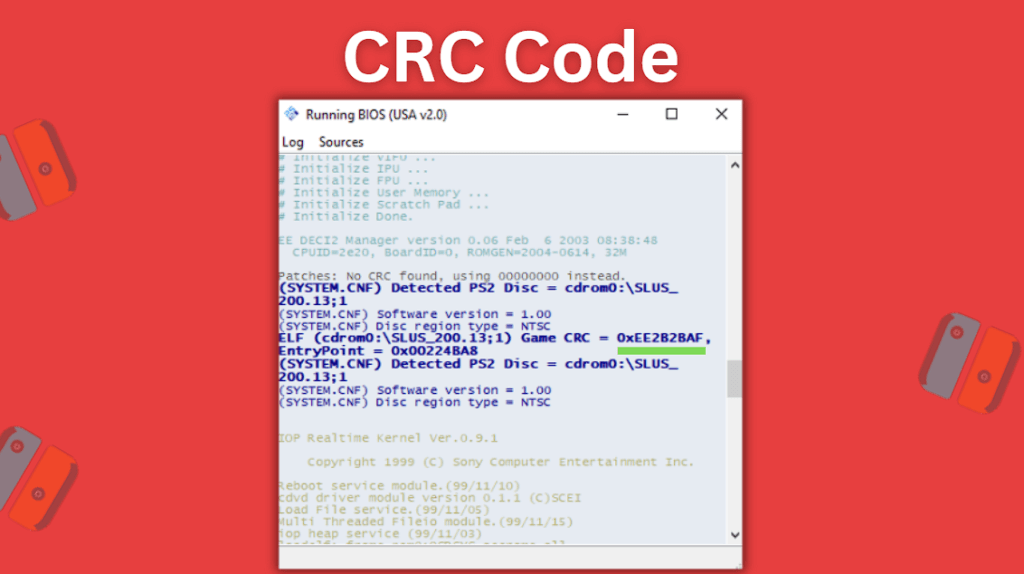
- In the screenshot above, the section underlined in green is the entire CRC code, and the part that comes after the 0x that is highlighted below is the section you’ll need to copy so that you can create the necessary .pnach file for your cheat codes
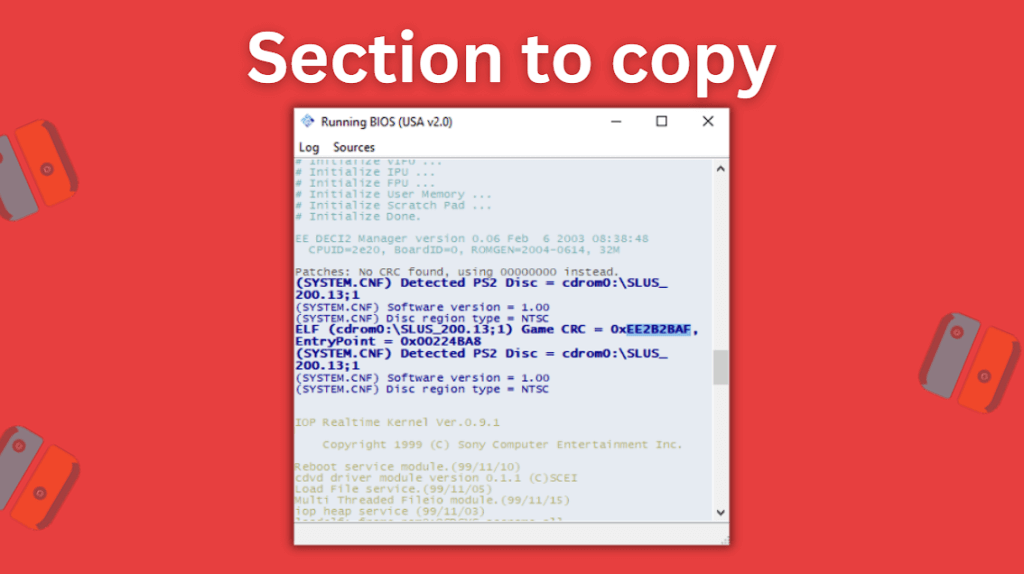
- Copy the section needed after the 0x and save it somewhere so that you can use it in a bit
How To Make A .pnach File For The PCSX2 Emulator
Now on your computer, head to the PCSX2 cheats folder. You’ll either find it in Program files or within the PCSX2 folder in your Documents folder at Documents > PCSX2 > cheats.
You’ll notice that the cheats folder is completely empty – this is normal.
- Right-clicking in the folder will bring up the sub-menu and allow you to create a new file by clicking New > Text Document
- Name the new text document the number that you copied from earlier that started after the 0x from your game’s CRC code
- Right-click the new document and select Edit
- Then go to File > Save As and reenter the number that you copied from earlier that started after the 0x from your game’s CRC code, but this time make sure to add a .pnach to the end of the file name – it will end up looking something like EE2B2BAF.pnach
- Before saving the new File name, go to Save as type and set it to All Files and then click the Save button
- Now, back in the cheats folder go ahead and delete the Text Document version and only keep the .pnach files’ version that you created
How To Add Cheats To The .pnach File
Next up, we’ll need to download an additional program called OmniConvert. OmniConvert will allow us to convert CodeBreaker codes into RAW code files and have these be readily usable for the PCSX2 emulator.
You can head over to the PCSX2 Forum to grab OmniConvert v1.0.3.
After OmniConvert has been downloaded and installed on your computer, go ahead and find the CodeBreaker cheat code that you want to use for your game here. If you can’t find a CodeBreaker code on that site, you may need to do a Google search for it.
After you’ve found the CodeBreaker code you want to use, open up OmniConvert and then:
- Set your input to CodeBreaker V1+ and your output to Unencrypted > Standard
- Now paste your CodeBreaker code into the left side and press the Convert button
- You’ll see it converted into the RAW code – this is the version we need to copy and use
- Copy the RAW code from the right side once it shows
How To Add A Cheat Code To PCSX2
Now we’ll be heading back to the .pnach file that we created earlier in our cheats folder.
You’ll need to list out the name of the code that you are adding, for example, Unlimited Lives, and then on the line underneath the name, you’ll paste the RAW code.
So an example of how you would need to enter this in your .pnach file would be:
- Unlimited Lives
patch=1,EE,203609D4,extended,8FA2319C
So if the raw code that you got from OmniConvert was 20409840 05F5E0FF it would need to be formatted in your .pnach file like so:
- Unlimited Lives
patch=1,EE,20409840,extended,05F5E0FF
You’d simply need to change out the bolded sections to your own cheat codes info.
Now go ahead and save your .pnach file and you should be good to go. Boot your game up in PCSX2 and the cheat should be enabled for you.
Also, be sure to check out our list of the best PS2 emulators.