
How To Use PPSSPP Cheats on PC in 2023 - Gaming News google.com, pub-1884294887586162, DIRECT, f08c47fec0942fa0
Gaming News
No Result
View All Result
  • PC
  • PlayStation
  • Xbox
  • Nintendo
  • Crypto Gaming
  • Reviews
  • Metaverse
  • Videos
  • PC
  • PlayStation
  • Xbox
  • Nintendo
  • Crypto Gaming
  • Reviews
  • Metaverse
  • Videos
No Result
View All Result
Gaming News
No Result
View All Result

How To Use PPSSPP Cheats on PC in 2023

August 27, 2023
in Nintendo
0 0
0
1
VIEWS
Share on FacebookShare on Twitter


In this guide, we’ll be walking you through the process of how to use PPSSPP cheats. This will entail where to get cheat codes, how to set up cheat codes on the PPSSPP emulator, and how to use the cheat codes.

We’ll also show you how you can download a list of every single PPSSPP cheat code for every PSP game out there using a PPSSPP cheat database file so you don’t have to manually add cheats for individual games.

This guide will be using one of the popular PSP games, Harvest Moon: Hero of Leaf Valley as the example title, but this guide will work regardless of the PSP game that you use.

How To Setup Cheat Codes for PPSSPP Games?

PPSSPP is the best PSP emulator you can use and enabling cheats for it is rather straightforward.

First things first, you’ll want to download a cheat database file. This file contains all the cheats for the PPSSPP emulator that you could ever need. This will save you tons of time and will keep you from having to tediously search for and add individual cheat codes for every single game that you play.

No more fiddling with .ini files or figuring out a game ID; this makes the cheats option extremely simple and intuitive.

Get the PPSSPP Cheat File

To get the cheats DB file:

  • Head to this Github for the database file here
  • Once on the Github page, click the Code button and then click Download Zip to download the Zip file
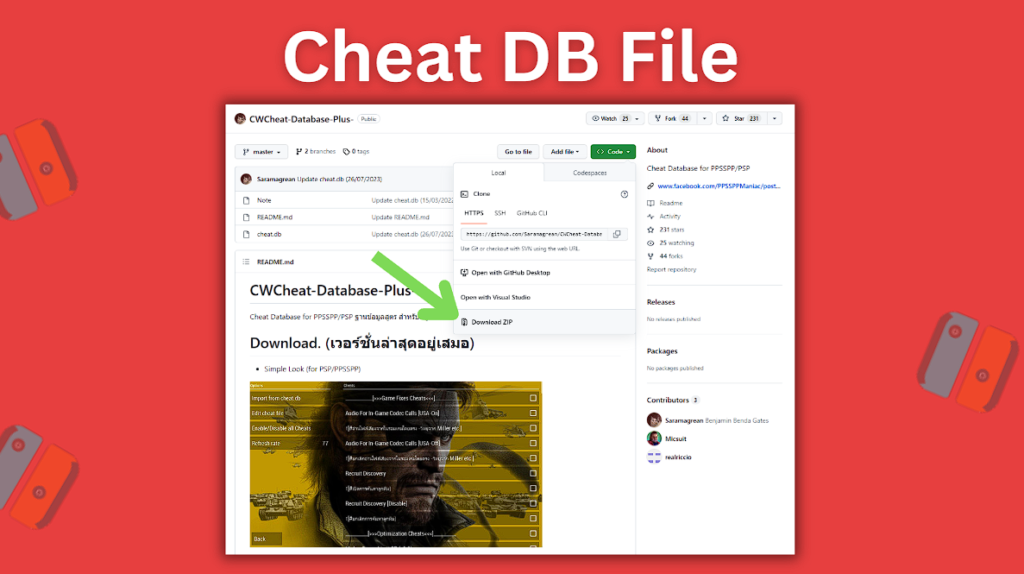
Download the cheat.db file from Github from Code > Download ZIP
Download the cheat.db file from Github from Code > Download ZIP.
  • Once the file has been downloaded, find it on your computer and then extract the files
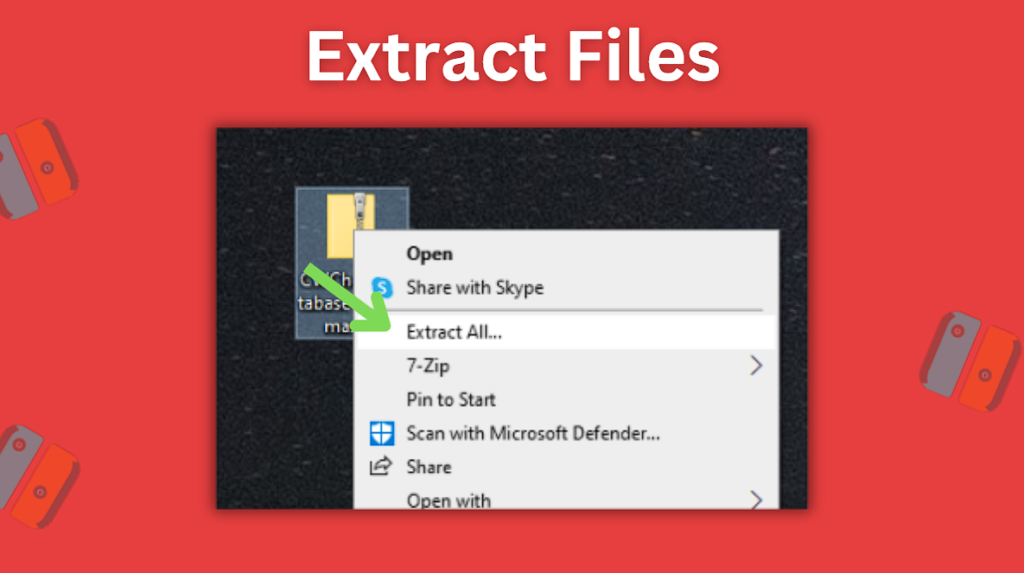
Extract the downloaded folder's files
Extract the downloaded folder’s files.
  • Once it is extracted, open up the CWCheat-Database-Plus–master folder
  • You will see a cheat.db file inside the folder which is the main file we’ll be working with
  • Now go ahead and keep the CWCheat-Database-Plus–master folder open while also navigating to your PPSSPP cheat folder
  • Find the PPSSPP folder on your computer (on a Windows basic install, the PPSSPP folder is located at C:\Users\[username]\Documents\PPSSPP
  • Click to open the PSP folder inside the directory and then open up the Cheats folder
  • Now drag the cheat.db file from your CWCheat-Database-Plus–master folder that you downloaded from Github into your Cheats folder for your PPSSPP emulator to add the file
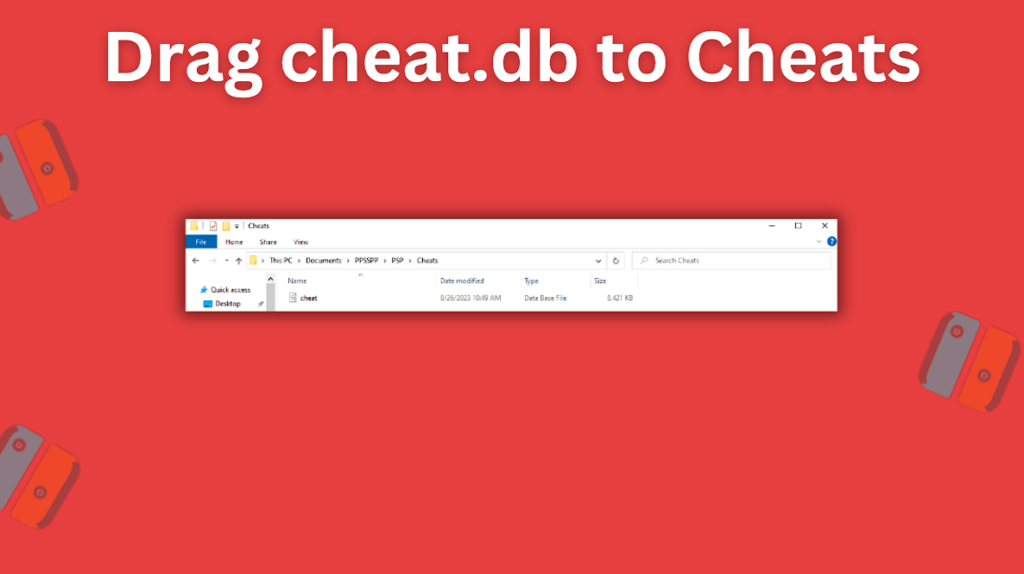
Drag the cheat.db folder into your Cheats folder
Drag the cheat.db folder into your Cheats folder.
  • Now all of the cheats from the cheat.db file have been added to the Cheats folder for the PPSSPP emulator
  • Now you’ll want to head back and start up the PPSSPP emulator
  • With the PPSSPP emulator now running, head to Settings > System > Enable cheats and then check the box to enable cheats
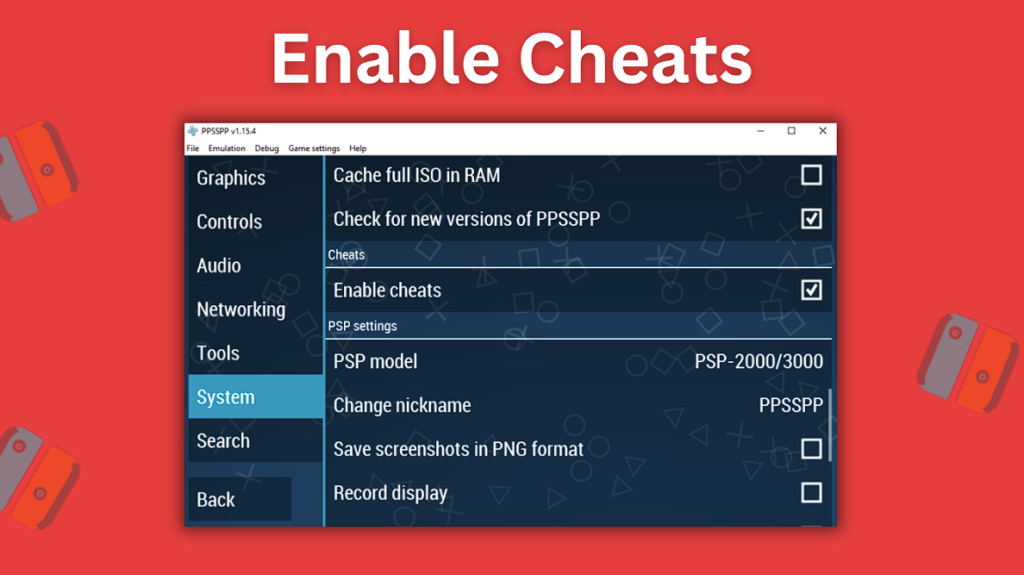
Enable cheats in the PPSSPP emulator by going to Settings > System > Enable cheats and checking the box
Enable cheats in the PPSSPP emulator by going to Settings > System > Enable cheats and checking the box.

When you’re using cheat codes for games, there’s always a small chance that you may end up accidentally corrupting your game’s save file. For this reason, it’s recommended you always create two separate save files. One save file while using cheats and one save file without using cheats. This way in case the cheats save file somehow gets corrupted, you won’t lose your progress in the game because you’ll have a backup.

We now have the cheat.db file added to the right location, we’ve enabled cheats in the PPSSPP emulator, and all that’s left is to start up a game and test.

  • Start up a PSP game in the PPSSPP emulator and once it has booted, press the Esc key to access the game’s menu
  • On the right-hand side, you’ll notice a new option called Cheats
  • If you click the Cheats menu option, you’ll notice that there are no cheat codes listed yet
  • This is because we still need to import out cheats from the cheat.db file
  • Click the button at the top Import from PSP/Cheats/cheat.db to begin importing your cheat codes
  • After clicking the button, you should see a list of available cheat codes appear on the right-hand side
  • You can now check the box for any cheat codes that you want to enable for your game and the desired cheat codes will automatically be applied for you
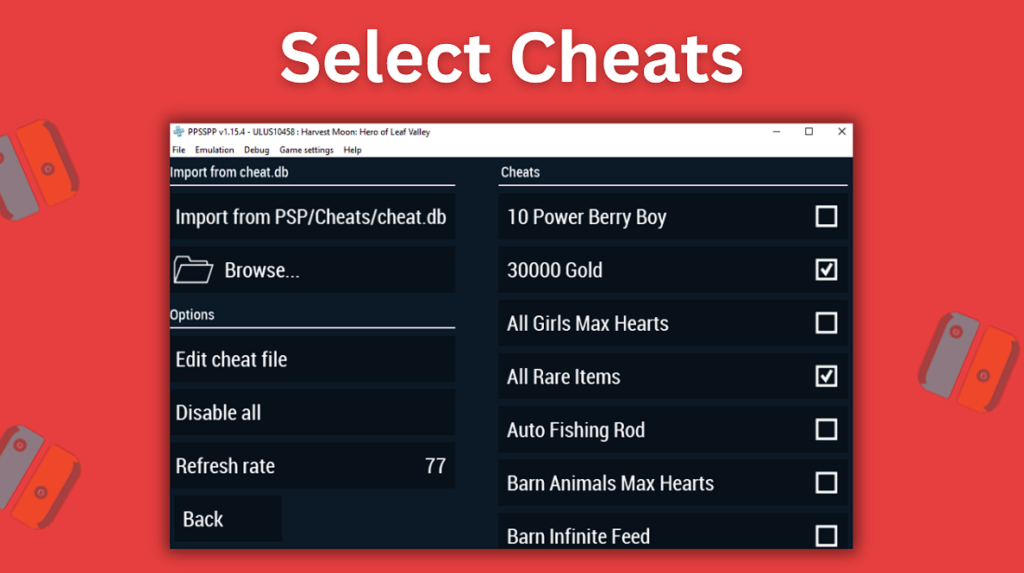
Import cheats from cheat.db and then select which cheats to enable.

And that’s really all there is to it. If you followed all of the steps correctly, you should now have successfully enabled cheat codes for PPSSPP, and any new games you play in the emulator you can easily import cheats for using the cheat.db file.

Be sure to periodically download the newest version of the cheats.db file to ensure you’re able to use the cheats that are added to it. The Github link that we shared at the beginning of this article is still continuing to be updated to this day so it’s the source we recommend you use moving forward.

Do you have an extra Raspberry Pi lying around? Check out our RetroPie PSP setup guide.


Source link

Previous Post

Best OFFLINE Games | 15 New Offline Games for Android of 2023 with HD Graphics

Next Post

Wordle 2023: Today’s answer and hint for August 27

Next Post
Wordle 2023: Today’s answer and hint for August 27

Wordle 2023: Today's answer and hint for August 27

Recommended

Die 8 besten Angeschlossen-Casinos Deutschlands 2026 inoffizieller mitarbeiter Kollation

June 3, 2026

Besten Bitcoin Casinos 2026 Abmachung, Boni, Take a look at

June 3, 2026

Beginnen met gokken De ultieme gids voor inexperienced persons in het on line casino

June 3, 2026

Mastering superior methods in playing An in-depth information to maximizing your odds

June 3, 2026

Gaming News

Get latest Gaming News on Pley2win.com. Popular Games, New released, Gaming Review, Xbox gaming, PlayStation, PC, Mobile Gaming and More!!

Categories

  • ! Valorant Boosting Tips
  • ! Без рубрики
  • 1
  • 10
  • 1000A Z
  • 1090A Z
  • 111
  • 18.12.1
  • 1win-np.com
  • 1xbetapp-ph.com3
  • 2000A Z
  • 237-Spassino Casino
  • 274 BeepBeep Casino –
  • 3
  • 318 Wizebets Italy
  • 4
  • 44
  • 5
  • 50%A 50 Z
  • 50%A 50B Z
  • 507-Pelican Casino
  • 777casino
  • 8
  • 800A 200BA Z
  • a16z generative ai
  • adobe generative ai 3
  • adobe generative ai 8
  • Article
  • Avocasino
  • bahisyasal 4521
  • Blog
  • Bookkeeping
  • Boomerang Casino
  • BT prod 5715
  • Business, Small Business
  • Casino
  • Casino De Arturo
  • casinocatspins
  • casinopinco
  • casinowazamba
  • catspinscasino
  • CH
  • Chicken Road rules
  • chickenroad
  • CIB
  • Computers, Games
  • cresuscasino
  • Crypto Gaming
  • de
  • dec_bh_common
  • dec_bh_main
  • dec_pb_common
  • December
  • dushscience.in
  • EC
  • edeka-halmschlag.de
  • Efbet Jackpots
  • Featured News
  • FinTech
  • first
  • Forex News
  • Forex Trading
  • Games
  • Gaming News
  • generative ai adobe photoshop 3
  • ghostinocasino
  • giochi
  • gokspel
  • hautarzt-rw.de
  • impressariocasino
  • jan4
  • jeux
  • jeuxi
  • Leon Casino
  • Leonbet
  • Live
  • Live Στοίχημα
  • lobby303sky.info
  • madnixcasino
  • Metaverse
  • Mobile Στοίχημα
  • mostbet
  • NEW
  • New Released
  • News
  • ninecasino
  • Nintendo
  • nko-zdrav.ru
  • nov2
  • nov6
  • novos-casinos
  • Online Casino
  • online καζίνο
  • PC
  • pinco
  • platinumslotscasino
  • PlayStation
  • Plinko
  • Plinko Online Casino
  • Popular
  • Post
  • Public
  • ready_text
  • Reviews
  • Rolldorado
  • rubds1010.ru 10
  • sep
  • Sex
  • Sober living
  • spel
  • Spellen
  • spiderbetscasino
  • Spiele
  • spiller1
  • Sport
  • Stake
  • tenexcasino
  • test
  • Trading
  • trends
  • Uncategorized
  • VeryWell Casino
  • Videos
  • voxcasino
  • vrclub-tron.ru 10
  • vulkanvegascasino
  • what to name your ai
  • Wildrobin
  • wildz
  • wildzcasino
  • www.xin-chao.de
  • Xbox
  • zuplay-in.com2
  • Αθλητικά Στοιχήματα
  • Καζίνο
  • Φρουτάκια
  • Блог
  • Новости Криптовалют
  • Текста
  • Финтех
  • Форекс Брокеры56

Follow us

  • DMCA
  • Disclaimer
  • Privacy Policy
  • Cookie Privacy Policy
  • Terms and Conditions
  • Contact Us

Copyright © 2022 - Pley 2 Win.

No Result
View All Result
  • PC
  • PlayStation
  • Xbox
  • Nintendo
  • Crypto Gaming
  • Reviews
  • Metaverse
  • Videos

Copyright © 2022 - Pley 2 Win.

Welcome Back!

Login to your account below

Forgotten Password? Sign Up

Create New Account!

Fill the forms below to register

All fields are required. Log In

Retrieve your password

Please enter your username or email address to reset your password.

Log In
This website uses cookies. By continuing to use this website you are giving consent to cookies being used. Visit our Privacy and Cookie Policy.