Guide To Setting Up Yuzu Cheats - Gaming News google.com, pub-1884294887586162, DIRECT, f08c47fec0942fa0
Gaming News
No Result
View All Result
  • Home
  • PC
  • PlayStation
  • Xbox
  • Nintendo
  • Crypto Gaming
  • Reviews
  • Metaverse
  • Videos
  • Home
  • PC
  • PlayStation
  • Xbox
  • Nintendo
  • Crypto Gaming
  • Reviews
  • Metaverse
  • Videos
No Result
View All Result
Gaming News
No Result
View All Result

Guide To Setting Up Yuzu Cheats

August 11, 2023
in Nintendo
0 0
0
63
VIEWS
Share on FacebookShare on Twitter


There aren’t a whole lot of guides online for Yuzu cheats. If you do a quick search, most of what you’ll find isn’t too helpful.

Last time we wrote about how to install Yuzu mods using the Yuzu Mod Downloader, but this time we’ve created this quick guide of instructions to help you get setup so that you can activate cheats with the Yuzu emulator in no time. By the time you finish, you should be all set and ready to go.

Let’s get started.

How To Setup Yuzu Cheats?

Yuzu is one of the best Nintendo Switch emulators you can use.

Before we begin, you should know that by default Yuzu will enable cheat codes by default after you add them properly. The Yuzu emulator should automatically detect your cheats folder and you can confirm that it is working after setting it up. More on that down below.

First off, you’ll want to head to a website that has a database of cheat codes. Once you have the cheat code you want to use, you’ll then want to also open up this site as they have the game information we need access to.

Once on the Tinfoil website, enter the name of the game that you want to find a cheat code for in the search bar and if it has the game available, it should popup.
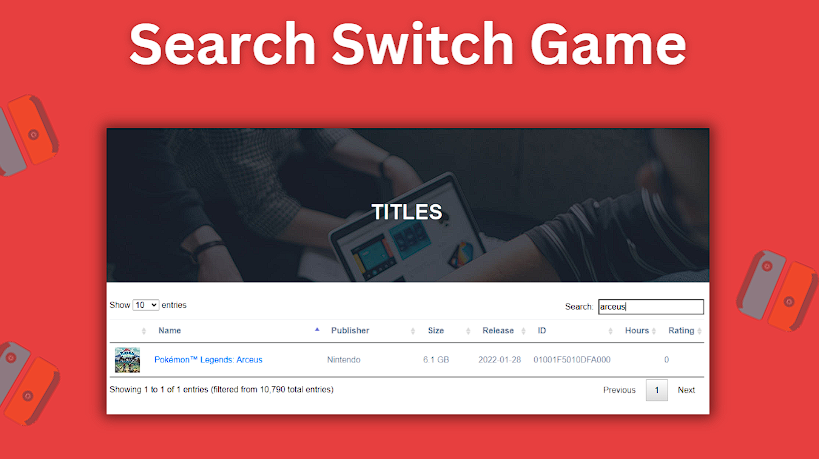
Search for the Switch game you are wanting to add cheats for
Search for the Switch game you are wanting to add cheats for.

Click on the game name to open the link and see more details for the title.

In the example screenshot above, I have searched for Arceus to pull up Pokemon Legends: Arceus.

Now open Yuzu if it wasn’t already. I’ll now find Pokemon Legends: Arceus in Yuzu and right click it to open up the Properties screen.
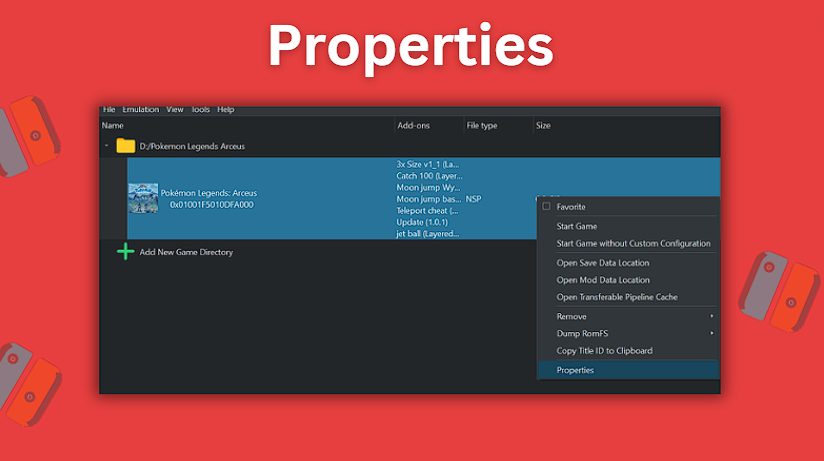
Right click the game in Yuzu and select Properties
Right click the game in Yuzu and select Properties.

In Properties > Add-Ons, on the left side you will see a list of information about the version of the game that you have installed and are using in Yuzu.
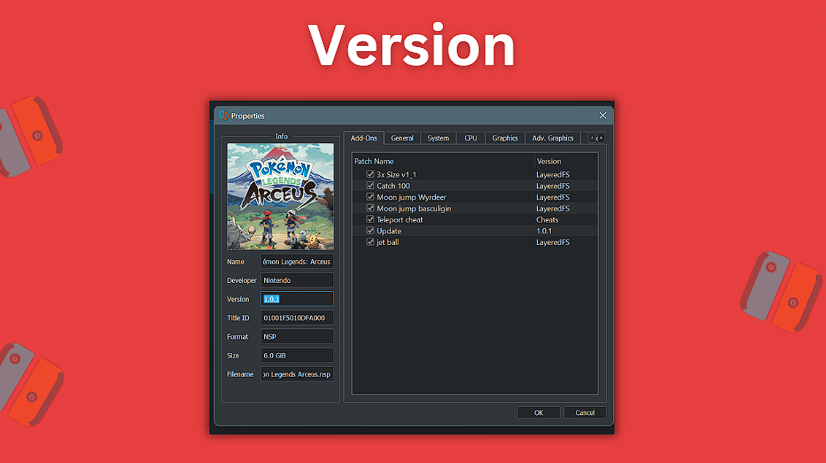
Find your version number for your game
Find your version number for your game.

In the screenshot above, you can see that the Version number shown is 1.0.1.

If we head back to the Tinfoil website and look at our Pokemon Legends: Arceus page and scroll all the way to the bottom, we will find a list of Build ID values accompanied by their appropriate version numbers.

In my case, because Yuzu showed that my version number is 1.0.1, I will take the outer most number after the final period and this is the version number of the game that I have. This means that 1.0.1 = v1.
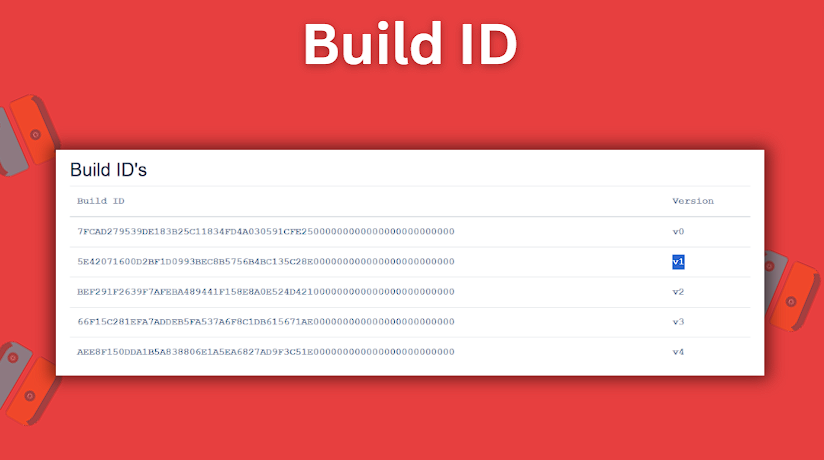
Find your version in the Build IDs
Find your version in the Build IDs.

If I had 1.0.0, this would mean my version would be v0 and so on.

On the Tinfoil website, you will need to copy the first 16 digits of the build id for the version of the game that you have. This number will vary depending on the game you are using and its version.
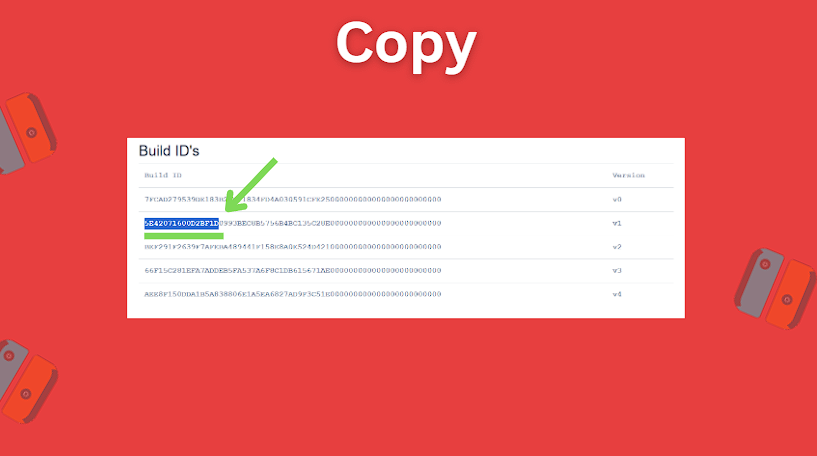
Copy the first 16 digits of the ID
Copy the first 16 digits of the ID.

Now head back to Yuzu and right click on the game again. This time select Open Mod Data Location.
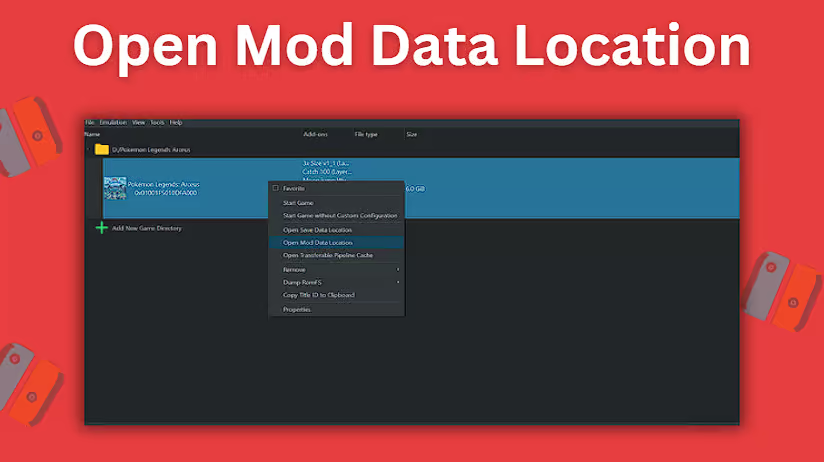
Right click the game and open Mod Data Location
Right click the game and open Mod Data Location.

Once the mods folder inside opens up, go ahead and create a new text file. Inside of your newly created text file, you will paste the cheat code that you want to use. Save this text file with the name of the build ID you copied (the first 16 digits that you copied from the Tinfoil website). Be sure to save this text file with its name being the 16 digit number that you pasted inside.

Next, right click in the Mod Data Location folder and create a new folder inside which you will name the name of the cheat that you are using. Inside this newly created folder, create another folder named cheats.

Drag and drop your 16 digit named cheat code text file into this newly created cheats folder so you can properly add cheats.

And just like that, you should now have added your cheat code to Yuzu and when you boot up the game the cheats should automatically be loaded. Happy Nintendo Switch gaming! If you have any additional questions, you can check the official Yuzu faq for more details.

Got a Steam Deck? Be sure to check out our Yuzu Steam Deck guide to find out how to get setup.


Source link

Previous Post

Trevor, Michael and Franklin's Back in Business | All full episodes

Next Post

Lichess Will No Longer Cooperate With US Chess Federation, Saint Louis Chess Club

Next Post
Lichess Will No Longer Cooperate With US Chess Federation, Saint Louis Chess Club

Lichess Will No Longer Cooperate With US Chess Federation, Saint Louis Chess Club

Recommended

Spiele Eye of Horus Kostenlose Promo Codes für oscar spin On line casino free of charge as a part of Hauptgewinn de

April 16, 2026

Eye anatomy: Muscle mass, arteries, 300 shields Slot großer Sieg nerves and lacrimal gland

April 16, 2026
Sintopia Evaluation – Team17’s Chaotic Simulation Experiment

Sintopia Evaluation – Team17’s Chaotic Simulation Experiment

April 16, 2026

Prize falls: Arbitrary prizes anyplace between 5 and 100 Sc

April 16, 2026

Gaming News

Get latest Gaming News on Pley2win.com. Popular Games, New released, Gaming Review, Xbox gaming, PlayStation, PC, Mobile Gaming and More!!

Categories

  • ! Без рубрики
  • 1
  • 10
  • 1000A Z
  • 1090A Z
  • 111
  • 18.12.1
  • 1win-np.com
  • 1xbetapp-ph.com3
  • 2000A Z
  • 44
  • 50%A 50 Z
  • 50%A 50B Z
  • 777casino
  • 8
  • 800A 200BA Z
  • a16z generative ai
  • adobe generative ai 3
  • adobe generative ai 8
  • bahisyasal 4521
  • Blog
  • Bookkeeping
  • BT prod 5715
  • Business, Small Business
  • Casino
  • casinocatspins
  • casinopinco
  • casinowazamba
  • catspinscasino
  • Chicken Road rules
  • chickenroad
  • cresuscasino
  • Crypto Gaming
  • dec_bh_common
  • dec_bh_main
  • dec_pb_common
  • December
  • dushscience.in
  • edeka-halmschlag.de
  • Efbet Jackpots
  • Featured News
  • FinTech
  • Forex News
  • Forex Trading
  • Games
  • Gaming News
  • generative ai adobe photoshop 3
  • ghostinocasino
  • giochi
  • gokspel
  • impressariocasino
  • jan4
  • jeux
  • jeuxi
  • Leon Casino
  • lobby303sky.info
  • madnixcasino
  • Metaverse
  • mostbet
  • NEW
  • New Released
  • News
  • ninecasino
  • Nintendo
  • nko-zdrav.ru
  • nov2
  • nov6
  • novos-casinos
  • Online Casino
  • online καζίνο
  • PC
  • pinco
  • platinumslotscasino
  • PlayStation
  • Plinko Online Casino
  • Popular
  • Post
  • Public
  • ready_text
  • Reviews
  • rubds1010.ru 10
  • sep
  • Sex
  • Sober living
  • spel
  • Spellen
  • spiderbetscasino
  • Spiele
  • spiller1
  • tenexcasino
  • test
  • Trading
  • trends
  • Uncategorized
  • Videos
  • voxcasino
  • vrclub-tron.ru 10
  • vulkanvegascasino
  • what to name your ai
  • wildz
  • wildzcasino
  • www.xin-chao.de
  • Xbox
  • zuplay-in.com2
  • Новости Криптовалют
  • Финтех
  • Форекс Брокеры56

Follow us

  • Home
  • DMCA
  • Disclaimer
  • Privacy Policy
  • Cookie Privacy Policy
  • Terms and Conditions
  • Contact Us

Copyright © 2022 - Pley 2 Win.

No Result
View All Result
  • Home
  • PC
  • PlayStation
  • Xbox
  • Nintendo
  • Crypto Gaming
  • Reviews
  • Metaverse
  • Videos

Copyright © 2022 - Pley 2 Win.

Welcome Back!

Login to your account below

Forgotten Password? Sign Up

Create New Account!

Fill the forms below to register

All fields are required. Log In

Retrieve your password

Please enter your username or email address to reset your password.

Log In
This website uses cookies. By continuing to use this website you are giving consent to cookies being used. Visit our Privacy and Cookie Policy.