How To Setup The RetroArch PSP Core PPSSPP | PC & Steam - Gaming News google.com, pub-1884294887586162, DIRECT, f08c47fec0942fa0
Gaming News
No Result
View All Result
  • PC
  • PlayStation
  • Xbox
  • Nintendo
  • Crypto Gaming
  • Reviews
  • Metaverse
  • Videos
  • PC
  • PlayStation
  • Xbox
  • Nintendo
  • Crypto Gaming
  • Reviews
  • Metaverse
  • Videos
No Result
View All Result
Gaming News
No Result
View All Result

How To Setup The RetroArch PSP Core PPSSPP | PC & Steam

July 21, 2023
in Nintendo
0 0
0
14
VIEWS
Share on FacebookShare on Twitter


If you’re looking for how to setup the RetroArch PSP core PPSSPP, you’ve landed on the right guide because we’ll be explaining how you can easily get set up and be playing your favorite PSP games in minutes. The Sony PSP has some great games that run very well on RetroArch when using the PPSSPP core.

PPSSPP is the best PSP emulator you can use and the fact that RetroArch has it available as a core is awesome.

RetroArch can emulate games from all sorts of different systems including the Sony PSP. We’ll break down how to download and setup the PPSSPP core for RetroArch so that you can get straight to playing your favorite PSP games.

We’ll be covering how to get setup with both the standalone version of RetroArch and also the Steam RetroArch version as well.

Alright, enough chit chat, let’s begin!

How To Setup The RetroArch PSP Core PPSSPP Standalone version?

Download RetroArch

  • You’ll first need to go ahead and download and install the RetroArch emulator which you can grab from the official website here. If you already have RetroArch installed, make sure you are on the latest stable version which you can get here.

Get your PSP ROM ready

Using a controller?

  • A USB or Bluetooth controller is recommended when playing your PSP games. That being said, while a controller is a much better for playing retro games than a keyboard, you can play however you wish.

    If you’re in the market for a capable new controller, an 8Bitdo SN30 Pro Wireless Bluetooth controller is a great choice and will only run you about $45 on Amazon.

1. How To Download The PPSSPP RetroArch Core?

Finding the PPSSPP Core

  • Once RetroArch opens, select Load Core
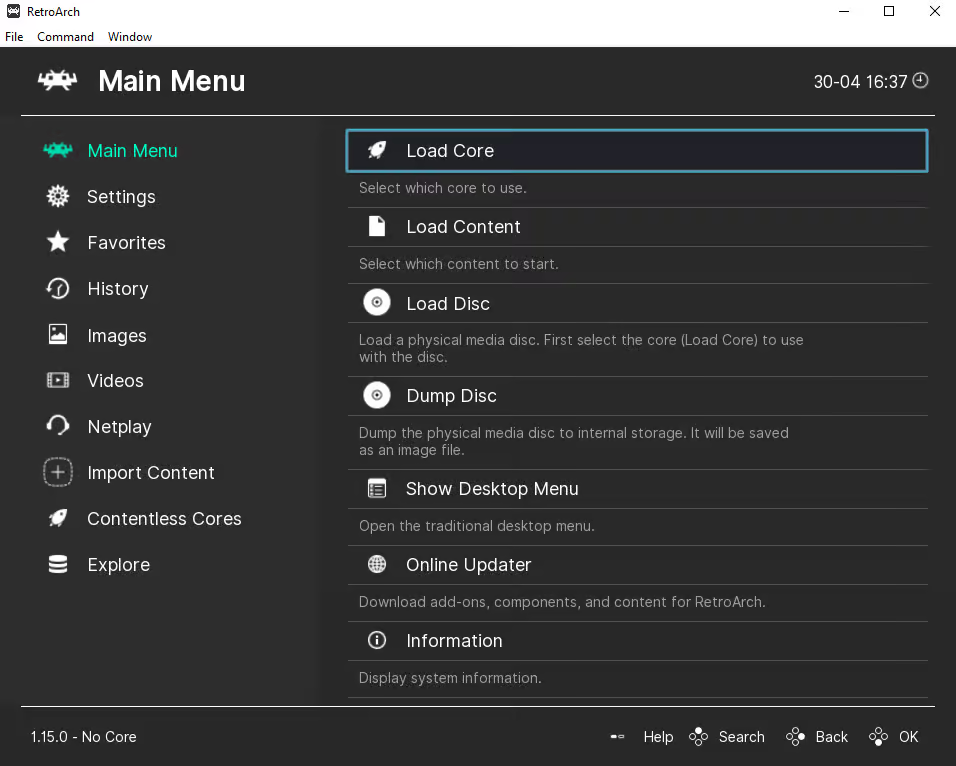
Load class=
Select the Load Core option in RetroArch
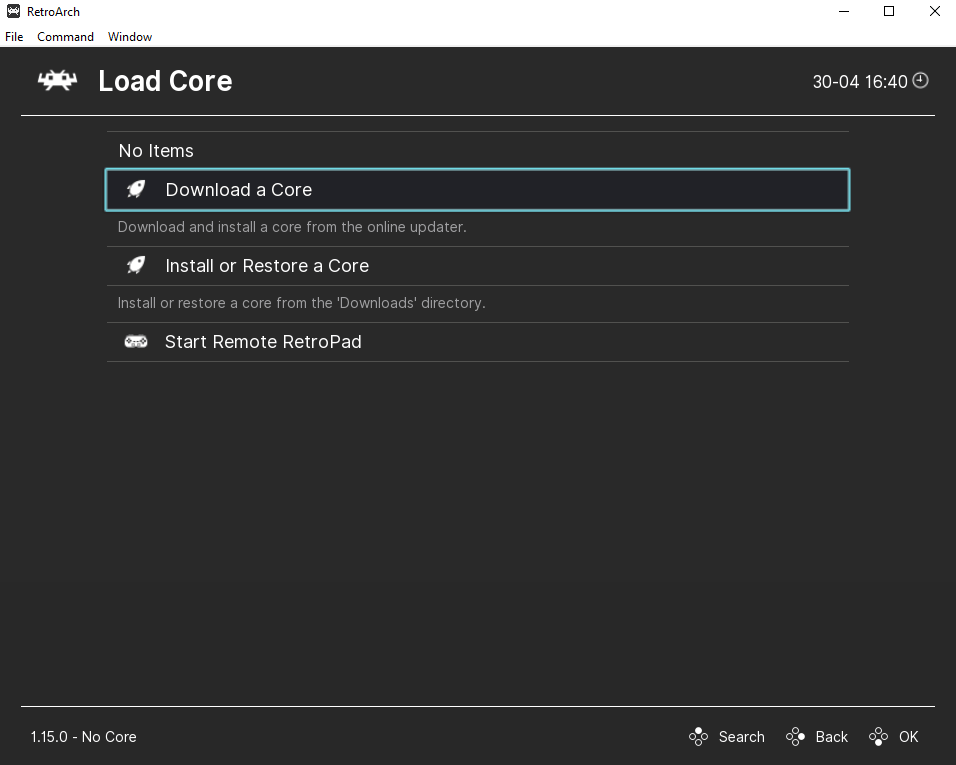
  • Next, choose Download a Core
Download a class=
Select to Download a Core

Downloading the PPSSPP Core

  • After, scroll all the way down until you see the Sony – PlayStation Portable (PPSSPP) core and click on it to download it
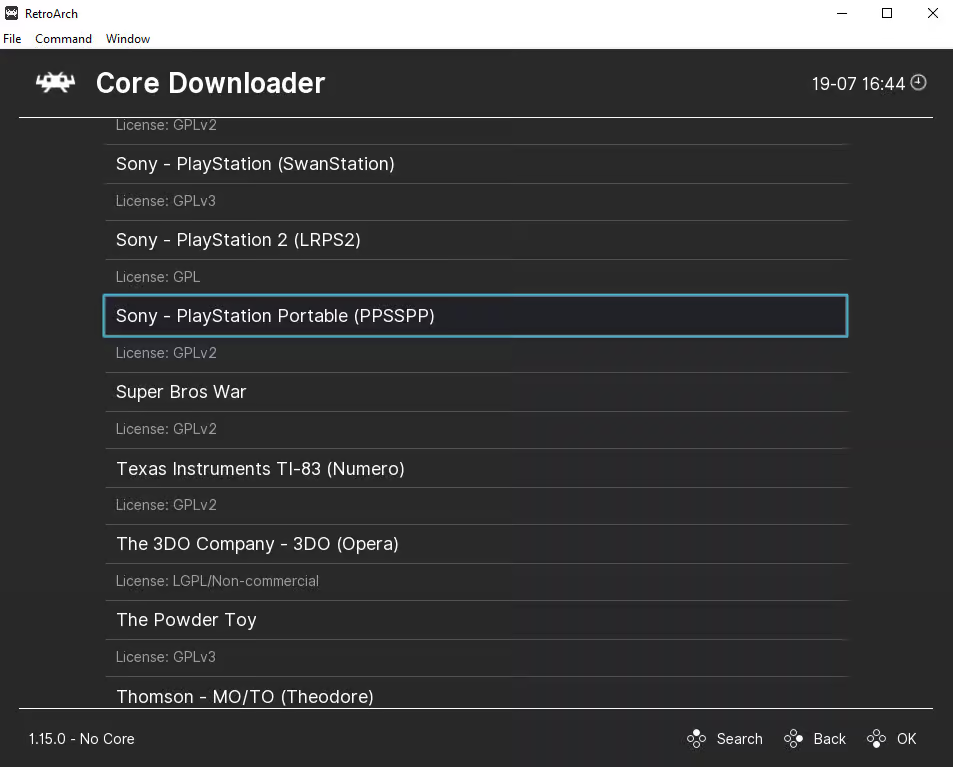
The Sony - PlayStation Portable (PPSSPP) core on RetroArch
The Sony – PlayStation Portable (PPSSPP) core on RetroArch
  • If RetroArch was already installed on your device, don’t forget to go back to the main menu screen and scroll down to select Online Updater and then select Update Core Info Files and also select Update Databases to ensure that all of your cores info files and databases are all up to date
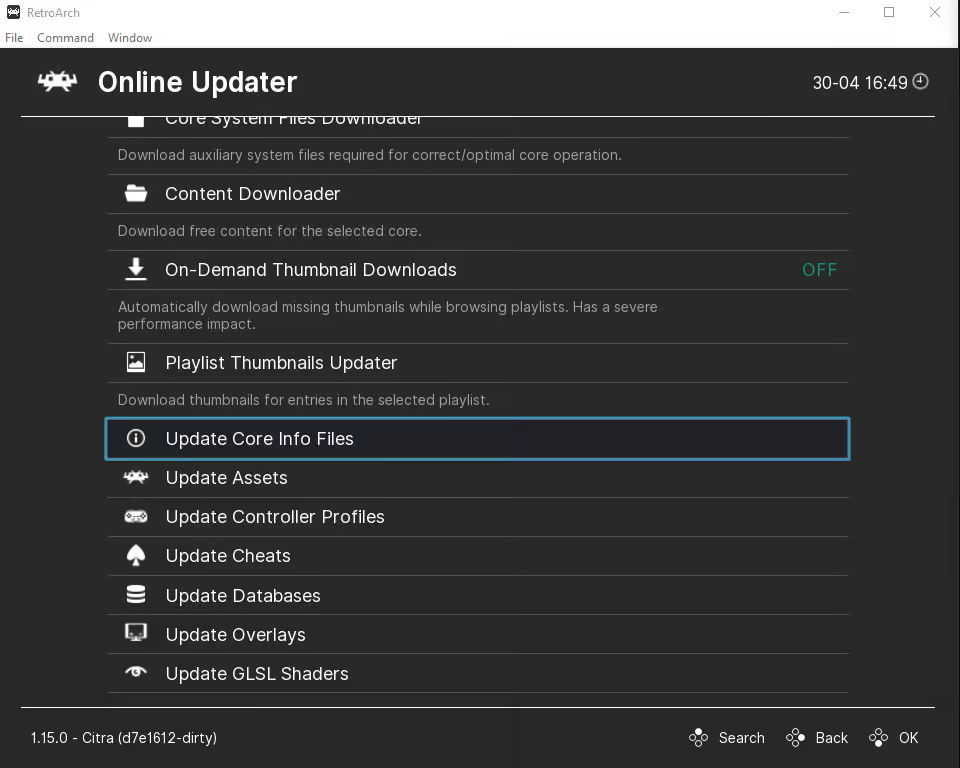
Update Core Info class=
Update Core Info Files
  • After it’s done downloading, you may now press back and then select Load Core

2. How To Load Your PSP ROM File In RetroArch

Go to Load Content

With the PSP core now installed in RetroArch, we’re ready to load up our PSP ROM file.

  • Head back to the main menu and select Load Content
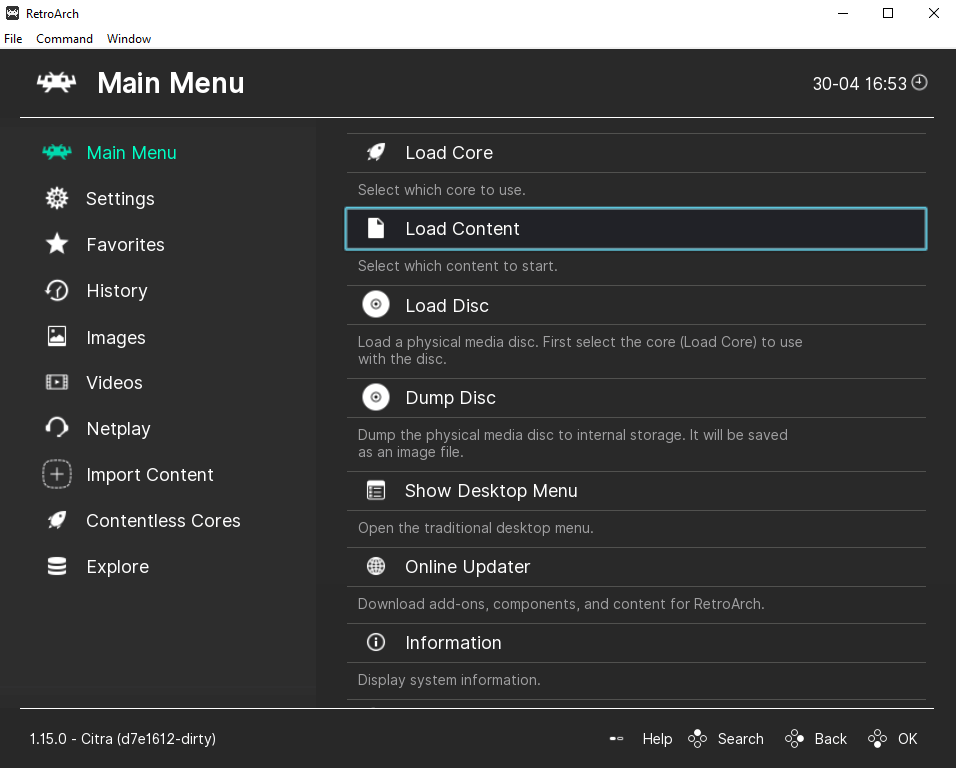
RetroArch Citra 3DS Load class=
  • Locate where you saved your PSP ROM on your computer and select it
  • Your PSP game should now launch and voila, just like that you’re all set and ready to play

How To Install RetroArch PPSSPP Core on Steam?

To install the RetroArch PPSSPP core on Steam you will also need to:

  • First, right click RetroArch on Steam > Manage > Browse local files.
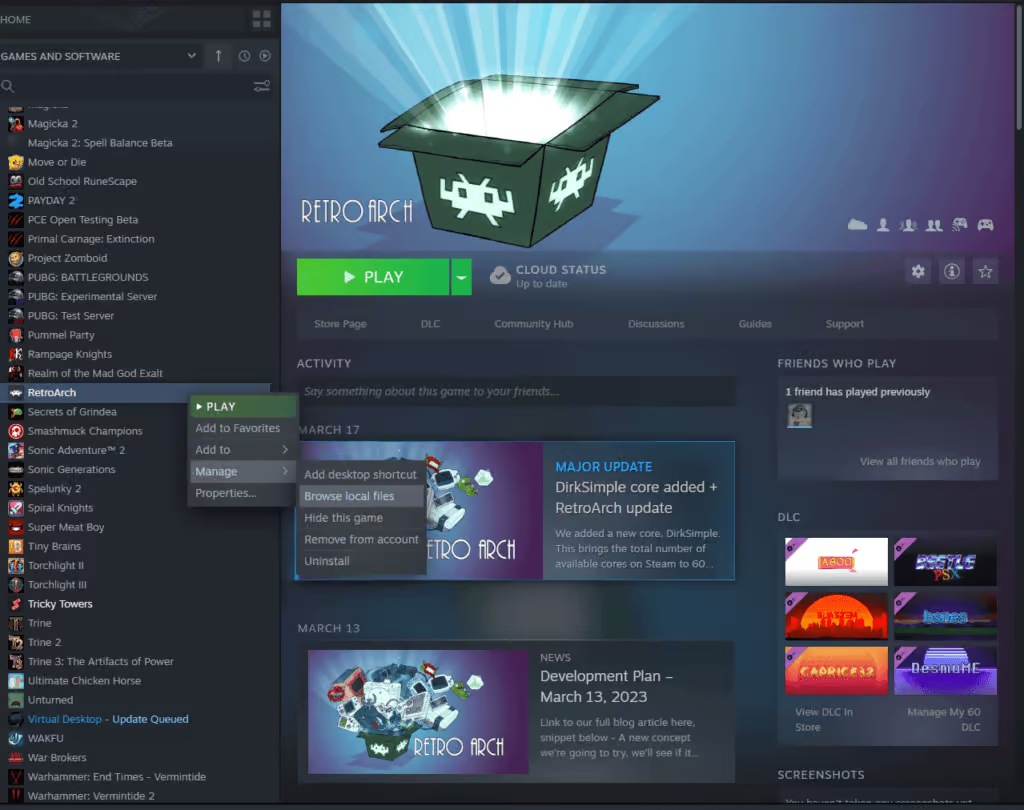
RetroArch Steam Citra 3DS class=
  • Once the Steam folder opens for the RetroArch files, open up the cores folder
  • Next, install the PPSSPP RetroArch core from the RetroArch buildbot here: https://buildbot.libretro.com/nightly/windows/x86_64/latest/ppsspp_libretro.dll.zip
  • After installing the PPSSPP core, extract the files from the ZIP folder you downloaded
  • Open up the extracted folder and copy the ppsspp_libretro.dll file into your Steam’s core folder
  • Next, install the PPSSPP RetroArch info files from the RetroArch buildbot here:
    https://buildbot.libretro.com/assets/frontend/info.zip
  • After installing the info files, extract them from the ZIP folder you downloaded and copy all of them into the “info” folder for your Steam version of RetroArch
  • Next open the Steam version of RetroArch and click Load Core to check that the Sony – PlayStation Portable (PPSSPP) core shows up – if it does, you’re all set
  • You’re now ready to play some PSP games on RetroArch right from the comfort of Steam

Additional PPSSPP Core Settings, Options, and Features

Supported Core File Extensions

The PPSSPP core supports the following file extensions:

Now that you’re all setup, you’re now ready to play some Sony PSP games!

Have a spare Raspberry Pi lying around? Be sure to check out our RetroPie PSP setup guide for the PPSSPP emulator as well.

This article may contain affiliate links. If you use these links to purchase an item, we may earn a commission. Thank you for your support!



Source link

Previous Post

Top 30 NEW Upcoming Single Player Games of 2023 & 2024 PS5, PS4, XSX, XB1, PC (4K 60FPS)

Next Post

Tekken 8 Reveals New Claudio Serafino Gameplay Trailer

Next Post
Tekken 8 Reveals New Claudio Serafino Gameplay Trailer

Tekken 8 Reveals New Claudio Serafino Gameplay Trailer

Recommended

On-line Casinos in Australia Favorites.1291 (2)

June 2, 2026

De Tren E 200 Cursus: Wat je Moet Weten

June 2, 2026

On line casino en ligne Julius bonus de bienvenue et promotions pour les joueurs.4889

June 2, 2026

Actual Tales of Massive Wins in Casinos

June 2, 2026

Gaming News

Get latest Gaming News on Pley2win.com. Popular Games, New released, Gaming Review, Xbox gaming, PlayStation, PC, Mobile Gaming and More!!

Categories

  • ! Valorant Boosting Tips
  • ! Без рубрики
  • 1
  • 10
  • 1000A Z
  • 1090A Z
  • 111
  • 18.12.1
  • 1win-np.com
  • 1xbetapp-ph.com3
  • 2000A Z
  • 237-Spassino Casino
  • 274 BeepBeep Casino –
  • 3
  • 318 Wizebets Italy
  • 4
  • 44
  • 5
  • 50%A 50 Z
  • 50%A 50B Z
  • 507-Pelican Casino
  • 777casino
  • 8
  • 800A 200BA Z
  • a16z generative ai
  • adobe generative ai 3
  • adobe generative ai 8
  • Article
  • Avocasino
  • bahisyasal 4521
  • Blog
  • Bookkeeping
  • Boomerang Casino
  • BT prod 5715
  • Business, Small Business
  • Casino
  • Casino De Arturo
  • casinocatspins
  • casinopinco
  • casinowazamba
  • catspinscasino
  • CH
  • Chicken Road rules
  • chickenroad
  • CIB
  • Computers, Games
  • cresuscasino
  • Crypto Gaming
  • de
  • dec_bh_common
  • dec_bh_main
  • dec_pb_common
  • December
  • dushscience.in
  • EC
  • edeka-halmschlag.de
  • Efbet Jackpots
  • Featured News
  • FinTech
  • first
  • Forex News
  • Forex Trading
  • Games
  • Gaming News
  • generative ai adobe photoshop 3
  • ghostinocasino
  • giochi
  • gokspel
  • hautarzt-rw.de
  • impressariocasino
  • jan4
  • jeux
  • jeuxi
  • Leon Casino
  • Leonbet
  • Live
  • Live Στοίχημα
  • lobby303sky.info
  • madnixcasino
  • Metaverse
  • Mobile Στοίχημα
  • mostbet
  • NEW
  • New Released
  • News
  • ninecasino
  • Nintendo
  • nko-zdrav.ru
  • nov2
  • nov6
  • novos-casinos
  • Online Casino
  • online καζίνο
  • PC
  • pinco
  • platinumslotscasino
  • PlayStation
  • Plinko
  • Plinko Online Casino
  • Popular
  • Post
  • Public
  • ready_text
  • Reviews
  • Rolldorado
  • rubds1010.ru 10
  • sep
  • Sex
  • Sober living
  • spel
  • Spellen
  • spiderbetscasino
  • Spiele
  • spiller1
  • Sport
  • Stake
  • tenexcasino
  • test
  • Trading
  • trends
  • Uncategorized
  • VeryWell Casino
  • Videos
  • voxcasino
  • vrclub-tron.ru 10
  • vulkanvegascasino
  • what to name your ai
  • Wildrobin
  • wildz
  • wildzcasino
  • www.xin-chao.de
  • Xbox
  • zuplay-in.com2
  • Αθλητικά Στοιχήματα
  • Καζίνο
  • Φρουτάκια
  • Блог
  • Новости Криптовалют
  • Текста
  • Финтех
  • Форекс Брокеры56

Follow us

  • DMCA
  • Disclaimer
  • Privacy Policy
  • Cookie Privacy Policy
  • Terms and Conditions
  • Contact Us

Copyright © 2022 - Pley 2 Win.

No Result
View All Result
  • PC
  • PlayStation
  • Xbox
  • Nintendo
  • Crypto Gaming
  • Reviews
  • Metaverse
  • Videos

Copyright © 2022 - Pley 2 Win.

Welcome Back!

Login to your account below

Forgotten Password? Sign Up

Create New Account!

Fill the forms below to register

All fields are required. Log In

Retrieve your password

Please enter your username or email address to reset your password.

Log In
This website uses cookies. By continuing to use this website you are giving consent to cookies being used. Visit our Privacy and Cookie Policy.