
A big part of Diablo 4 is collecting the best loot possible, but sometimes no matter how cool the loot is, you want your character’s appearance to be the center of attention.
However, this can be tricky, with some headgear covering most of your characters’ faces. This is not a problem! You can hide the helmet you have equipped in Diablo 4 once you reach the first Wardrobe in Kyovashad.
Easiest Way to Hide Your Helmet in Diablo 4
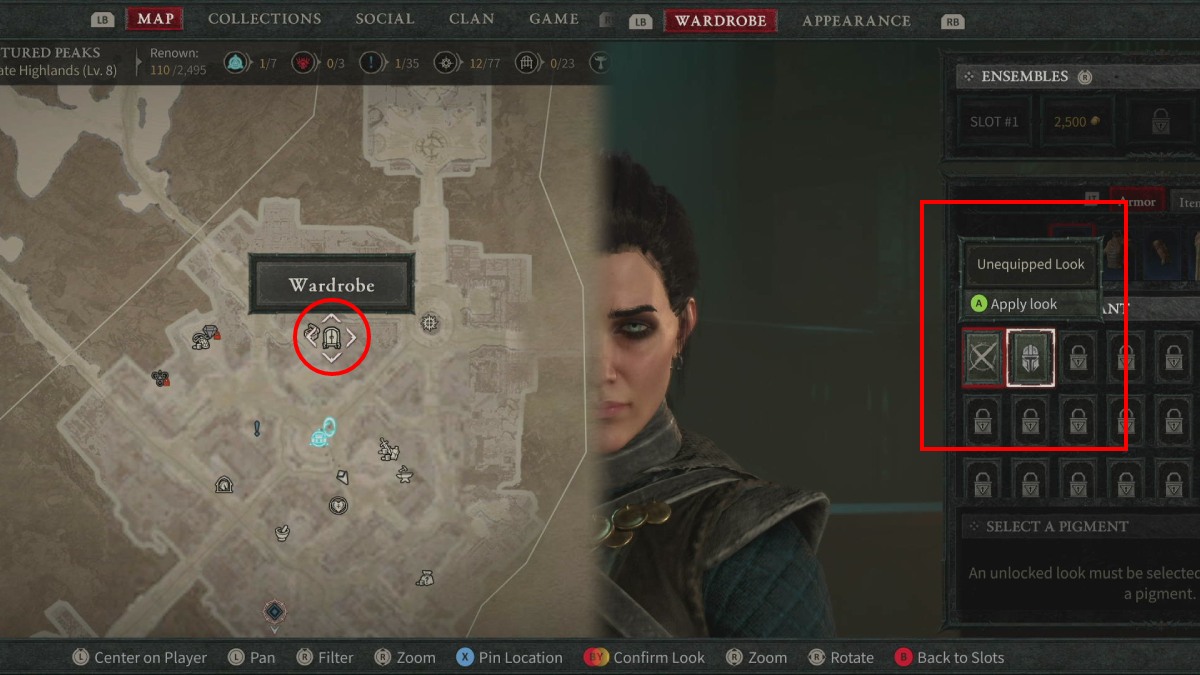
You can easily hide your helmet by interacting with any Wardrobe and selecting the “Unequipped Look” option for your headgear slot.
You can find the first Wardrobe in Kyovashad, one of the game’s starting areas. Additionally, Wardrobe locations all around Sanctuary are marked on the map with a wardrobe icon.
- Reach Kyovashad*.
- You will find this area right after meeting Lorath Nahr at the Windswept Cabin and finishing the Rite of Passage quest in the initial segment of the game.
- If you have already visited this area, you can fast-travel using the Kyovashad Waypoint.
- The Wardrobe in Kyovashad is located in the second story of the inn to the left of the Kyovashad Waypoint. It is in the same room where you can find the Stash chest.
- Once at this location, interact with the Wardrobe and select the “Modify Slot” option for your headgear slot.
- Finally, select “Apply Look” for the “Unequipped Look” option. This will hide your helmet in Diablo 4.
*Note: You can use any Wardrobe in the game, but this is the first one you will encounter.
If you want to avoid repeating this process over and over again, it is a good idea to create some Ensembles. These are saved templates of looks you want for your character.
Ensembles even save the “Unequipped Look” option for any of your gear, making it easier to swap looks on the go.
Now that you can hide your helmet and get the look you want in Diablo 4, visit the Purveyor of Curiosities vendor in the area! You can buy some Whispering Keys from them to open many Silent Chests that await in upcoming quests.


