
Diablo 4 Beta: How to swap weapons - Gaming News google.com, pub-1884294887586162, DIRECT, f08c47fec0942fa0
Gaming News
No Result
View All Result
  • Home
  • PC
  • PlayStation
  • Xbox
  • Nintendo
  • Crypto Gaming
  • Reviews
  • Metaverse
  • Videos
  • Home
  • PC
  • PlayStation
  • Xbox
  • Nintendo
  • Crypto Gaming
  • Reviews
  • Metaverse
  • Videos
No Result
View All Result
Gaming News
No Result
View All Result

Diablo 4 Beta: How to swap weapons

March 19, 2023
in Featured News
0 0
0
1
VIEWS
Share on FacebookShare on Twitter


One of the newer features of Diablo 4 is that it has swappable weapons for each class. Depending on what you play, and how you play, it could alter your gameplay significantly. Having weapons you can switch on the go may make combat more fluid. However, Diablo 4 has an intriguing way to do this. It took me some time to figure it out. Since there’s no obvious of the game telling you, here’s a guide on how to swap weapons in the Diablo 4 Beta. 

How to swap weapons in Diablo 4

The more you play, the more you level up your character. This results in you earning experience points, which can be spent on a skill tree. These skills are the main way to change your weapons. To use your other weapon, you need to activate the skill tied to it.

Each weapon you pick up will show you what type it is. For example, I played as the Barbarian. His main weapons are classified as Blunt Weapon for the left hand, and Slasher Weapon for the right. So, I would need to find weapons that belong in the appropriate section.

Note that in the Diablo 4 Beta, each class has different titles for the weapon slots. Checking the weapons you found should help you figure out where it belongs.
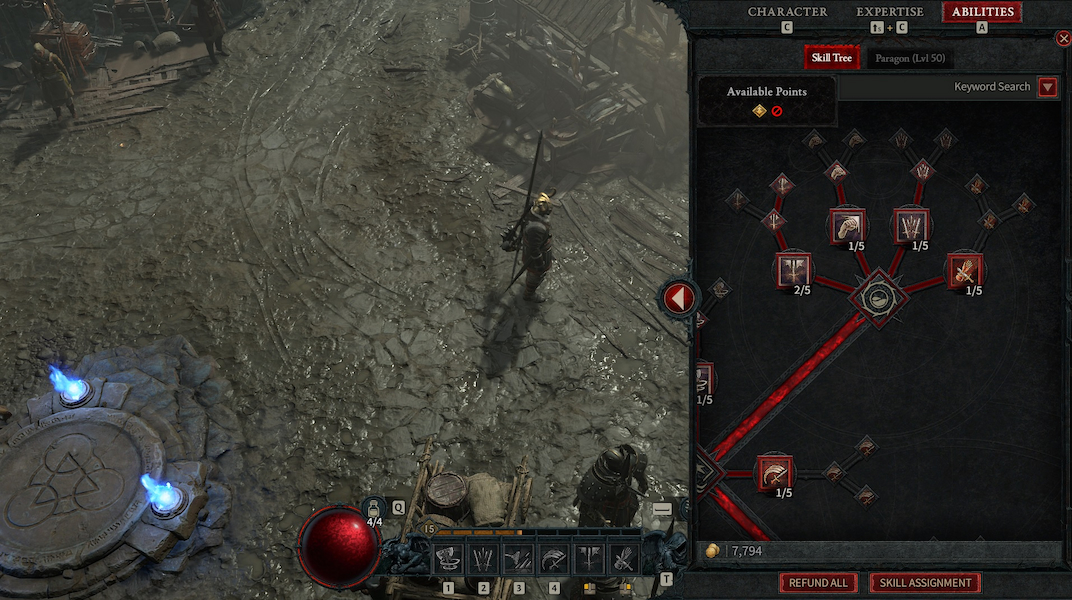
Diablo 4 Accessing The Skill Menu

Screenshot by PC Invasion

How to equip other skills

To get skills to use other weapons, head to the Skills Tree menu by pressing the ‘A key’ or appropriate controller button. There, you can unlock skills with a skill point once you’ve leveled enough to earn one. Equipping the skill is done in another menu. Tap the ‘S key’ to bring up the skills you’ve bought. From there, drag the skill to a key bind or mouse button.

Additionally, there’s more than one skill per weapon type. Adding key binds that can be switched on a whim could help you create any build you see fit.

At the start, this new way of switching weapons may be confusing, and a step up from Diablo 3 where you would simply drag the weapon into the right slot. But this seems to be a much more engaging way to play. Knowing how to swap weapons early on may make the combat of the Diablo 4 Beta a little easier, especially if you’re playing it on a harder difficulty.


Diablo 4 is available on Battle.net.


Source link

Previous Post

Octopath Traveler: Champions of the Continent Getting NieR: Automata Collaboration

Next Post

Roblox – FICAMOS COM MEDO DAS PERGUNTAS ASSUSTADORAS (Start Survey) | Luluca Games

Next Post
Roblox – FICAMOS COM MEDO DAS PERGUNTAS ASSUSTADORAS (Start Survey) | Luluca Games

Roblox - FICAMOS COM MEDO DAS PERGUNTAS ASSUSTADORAS (Start Survey) | Luluca Games

Recommended

Casinia On line casino: Γρήγορα Spins και Απολαυστικές Δραστηριότητες για Cell Παίκτες

April 16, 2026

Thunderstruck interac on-line on line casino Stormchaser Slot Opinion 2026 Completely free Gamble Trial

April 16, 2026

Thunderstruck Demo Play Completely free Slots at on line casino spin no deposit bonus the Nice com

April 16, 2026

Finest On-line on line casino Bonuses 2026 Best Join free cash line Provides

April 16, 2026

Gaming News

Get latest Gaming News on Pley2win.com. Popular Games, New released, Gaming Review, Xbox gaming, PlayStation, PC, Mobile Gaming and More!!

Categories

  • ! Без рубрики
  • 1
  • 10
  • 1000A Z
  • 1090A Z
  • 111
  • 18.12.1
  • 1win-np.com
  • 1xbetapp-ph.com3
  • 2000A Z
  • 44
  • 50%A 50 Z
  • 50%A 50B Z
  • 777casino
  • 8
  • 800A 200BA Z
  • adobe generative ai 3
  • adobe generative ai 8
  • bahisyasal 4521
  • Blog
  • Bookkeeping
  • BT prod 5715
  • Business, Small Business
  • Casino
  • casinocatspins
  • casinopinco
  • casinowazamba
  • catspinscasino
  • Chicken Road rules
  • chickenroad
  • cresuscasino
  • Crypto Gaming
  • dec_bh_common
  • dec_bh_main
  • dec_pb_common
  • December
  • dushscience.in
  • edeka-halmschlag.de
  • Efbet Jackpots
  • Featured News
  • FinTech
  • Forex News
  • Forex Trading
  • Games
  • Gaming News
  • generative ai adobe photoshop 3
  • ghostinocasino
  • giochi
  • gokspel
  • impressariocasino
  • jan4
  • jeux
  • jeuxi
  • Leon Casino
  • lobby303sky.info
  • madnixcasino
  • Metaverse
  • mostbet
  • NEW
  • New Released
  • News
  • ninecasino
  • Nintendo
  • nko-zdrav.ru
  • nov2
  • nov6
  • novos-casinos
  • Online Casino
  • online καζίνο
  • PC
  • pinco
  • platinumslotscasino
  • PlayStation
  • Plinko Online Casino
  • Popular
  • Post
  • Public
  • ready_text
  • Reviews
  • rubds1010.ru 10
  • sep
  • Sex
  • Sober living
  • spel
  • Spellen
  • spiderbetscasino
  • Spiele
  • spiller1
  • tenexcasino
  • test
  • Trading
  • trends
  • Uncategorized
  • Videos
  • voxcasino
  • vrclub-tron.ru 10
  • vulkanvegascasino
  • what to name your ai
  • wildz
  • wildzcasino
  • www.xin-chao.de
  • Xbox
  • zuplay-in.com2
  • Новости Криптовалют
  • Финтех
  • Форекс Брокеры56

Follow us

  • Home
  • DMCA
  • Disclaimer
  • Privacy Policy
  • Cookie Privacy Policy
  • Terms and Conditions
  • Contact Us

Copyright © 2022 - Pley 2 Win.

No Result
View All Result
  • Home
  • PC
  • PlayStation
  • Xbox
  • Nintendo
  • Crypto Gaming
  • Reviews
  • Metaverse
  • Videos

Copyright © 2022 - Pley 2 Win.

Welcome Back!

Login to your account below

Forgotten Password? Sign Up

Create New Account!

Fill the forms below to register

All fields are required. Log In

Retrieve your password

Please enter your username or email address to reset your password.

Log In
This website uses cookies. By continuing to use this website you are giving consent to cookies being used. Visit our Privacy and Cookie Policy.