A few days back, we posted an article about the public beta of the new Action Shooter mobile game Area F2. The game is currently under open beta testing in only a few select countries. That means not everyone can download and enjoy Area F2 right now. So, in today’s article, we will guide you through the process of How to download Area F2 apk in any region for Android as well as iOS.
Area F2 – The Word’s First Mobile 5v5 Close Quater Battle Game
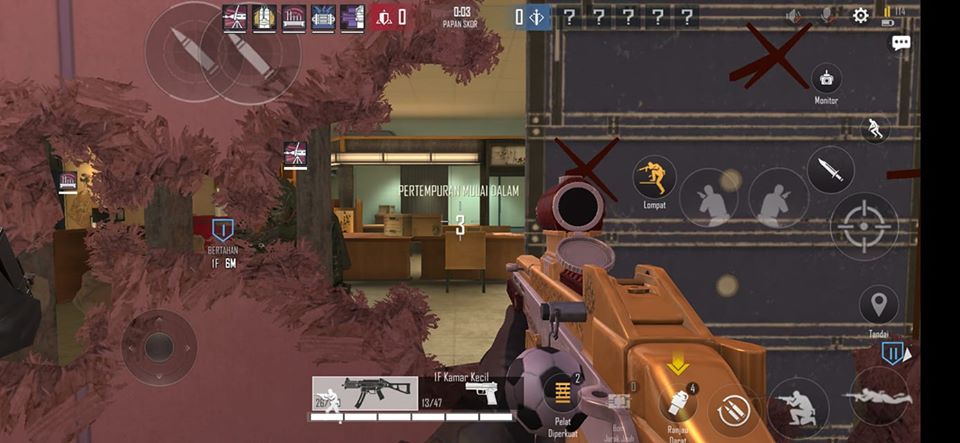
Area F2 is a brand new online Action shooter mobile game that focuses on Close Quater combat. The Mobile game comes from the house of an unknown Chinese developer Qookka Games. The game is a fresh take on the now ubiquitous battle royale game that focuses on outdoor run and gun tactics.
Our first impression of the game was excellent. Yes, the gameplay feels taken straight out of Ubisoft’s Rainbow Six Sige (check our previous article for more). But there is no denying that the game feels very fresh for a Mobile action shooter.
The game is under beta testing 11 countries, namely – Brazil, Indonesia, Thailand, Malaysia, India, Philippines, Russia, Belarus, Turkey, Ukraine, and Mexico.
If you are in the region, you can skip this article and download Area F2 right away from Google PlayStore or Apple AppStore, depending on your device.
However, If you are not from the regions mentioned above, this guide is for you.
How to Download Area F2 from Anywhere in the World

Area F2 is available for Both ios and Android we will go through how to install area f2 on Android followed by How to download and install Area F2 iOS.
How to Install Area F2 on Android Device
Now, before we start, we recommend that you check the system requirements of Area F2 right here. It is essential for android users, as you are going to sideload the app.
There are four ways/methods to install Area F2 on your android device.
Method 1: From Google PlayStore
Even if you are not from the 11 countries mentioned earlier, you can still download Ara F2 from google PlayStore by changing your region.
This is the best way to Download and install area F2 on your android device. All you need is a VPN app and a secondary Gmail address.
Note that the process is a bit tricky. So, follow the steps carefully.
- First, create a Gmail account. You can click here to directly go to the Gmail sign up page.
- Create a new email id and password.
- Fill in all the details, phone number as usual. Don’t add it to your android device yet.
- Download a VPN app from PlayStore. we recommend Turbo VPN but you can use any VPN app.
- Launch the app tap the earth icon on the top right corner and Select India.
- Once connected minimize the app and add your newly created Gmail to your phone.
- To do that go to the Gmail app on your phone> tap on the three-lines> scroll down to setting> add account> Google> fill in your new Gmail and password.
- Once done, go to your phone settings> installed apps> search for “Play” and clear the cache and force stop the app.
- Now, launch PlayStore and tap on your profile picture on the top right.
- from the list your new Gmail account
- You are now in the Indian Google Playstore!
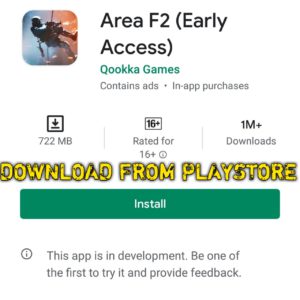
- Now, search for Area F2 in the PlayStore and install it on your device.
Method 2: Through a third-party App Market TapTap
- Download the TapTap app on your android phone. Download the app here
- Tap on try the android beta version.
- The TapTap apk file will be downloaded.
- Now, to install the app on your phone, you need to turn on allow installation from other sources.
- Go to settings>additional settings> Privacy> Turn on unknown sources.
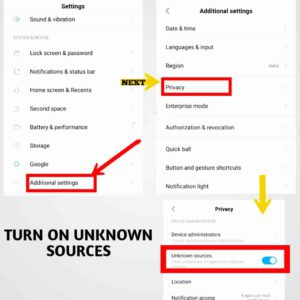
- Now install the tap tap app.
- Once installed, open the tap tap app and search for Area F2.
- Now install the game and enjoy it!
Method 3: Install Area F2 Manually on your Android Device
- First up, you need to download Area F2 apk and OBB files. You can download them from here.
- Click on download XAPK.
- Once downloaded, rename “Area F2_v1.0.60_apkpure.com.xapk” to “Area F2_v1.0.60_apkpure.com.zip”.
- Now, extract the file with any extraction software or app.
- You will find the Area F2 apk and a folder named ‘Android.’ Install the Area f2 apk on your device. Remember, you have to turn on installation for unknown sources.
- Once installed, don’t open the app just yet.
- Go to the folder where you have extracted the XAPK and open the folder named’ Android>Open the folder named ‘obb’> Copy the folder inside it.
- Now, Go to your phone storage> Android> obb and paste the copied file.
- Done! Launch the game and enjoy it!
Method 4: by Changing Your Google Play Region Officially (Not Recommended)
Warning: you should never try this with your primary Gmail.
We highly recommend you to open another Gmail account, add it to your device and try this method. You will need a VPN app for this to work. We recommend Turbo VPN.
Here is what you need to do.
- Download and install Turbo VPN from Google PlayStore or any other VPN app
- Launch the app tap the earth icon on the top right corner
- Select India
- Open Google PlayStore (Make sure you NOT are signed into your primary Account)
- Swipe left and go to Account
- Scroll down to the bottom, and you see a message saying ‘switch to PlayStore India.’
- add a payment method. The process takes 48 hours to complete. So, keep your patience.
- Once the waiting period is over, search for Area F2 in the PlayStore and install it on your device.
How to install Area F2 on iOS Device
If you are an Apple user and the game is not available in your country, you can change your country in AppStore to download and install Area F2 on your ios device.
Here is how you do it.
- Open AppStore and tap on your picture on the top-right corner. Now, tap on your Apple ID and tap on Country or Region.
- On the next screen, tap on Change Country or Region.
- Choose Indonesia, agree to the terms, and hit agree to confirm.
- Now, you will need to select a payment method.
- Choose none.
- On the next screen, fill in your name and address. Note that the address needs to be from Indonesia. You can google for an Indonesian address and add phone number 123456789.
- Once done, hit next.
- Congratulations! You have successfully changed your Apple Appstore region.
- Now, search for Area F2 in the AppStore and install it on your ios device.
- Enjoy the Game!
Here is a video to help you further. (Video Credit: AppleFrendly on YouTube)
That’s it for today! We hope our article on ‘How to Download Area F2 in Any Region for Android and iOS‘ was helpful.
In this article, we have tried our best so that anyone can download and play Area F2. Now, it’s your turn. Share this article with friends and family, and don’t forget to follow Shadow Knight Gaming for more!
Cheers.