
Chemistry in FIFA 23 has been completely reworked to emphasize each individual player rather than the entire team.
One of the most important aspects of FIFA Ultimate Team is understanding how Chemistry works and being able to get the most of the boosts it provides.
But in FIFA 23, EA Sports has completely changed the way Chemistry works. Thankfully, we’ve put together all the important changes for you here.
How Does Chemistry Work in FIFA 23?
Chemistry is the connections between your players regarding their team, league, and nation. The stronger the connection between the players, the better their in-game stats will be.
In FIFA 23, EA has completely reworked the way chemistry links work. Here is how it works:
- Squad Chemistry has been completely removed. You will no longer see the meter right below your squad name.
- A new chemistry system is now in place that will be unique to each player.
- Players will no longer harm their stats by having low chemistry. They will always play with their base stats.
- Each player now has a diamond indicator on their card, which shows how much chemistry they have from 0-3 with your current squad.
- Before, you would need to place the players adjacent to each other on your team for the chemistry links to take effect.
- But in FIFA 23, players will only need to be in the same formation for the chemistry links to activate.
- A new Chemistry Panel on your screen shows you which clubs, leagues, and nations you currently have in your formation.
- This will allow players to know exactly where they need to improve their chemistry links and what players to look out for.
- Any player that you have on your team will need to be in the position
- Players will now be able to have up to three secondary positions.
- This means that those players that are versatile in real life will be able to translate those skills to FIFA 23.
- The Loyalty Bonus gained by playing 10 games with a player to obtain maximum chemistry has been completely removed.
Check out our complete FIFA 23 Ultimate Team Guide for a detailed on how to make the best possible team and use Chemistry to its best extent.

How to Build Player Chemistry
FIFA 23 will no longer feature Squad Chemistry. Instead, it will focus on developing the Chemistry of each player on your team. Players can obtain up to three Chemistry points.
Three primary factors go into determining your player’s Chemistry, including:
Preferred Position
- The only way to raise your Chemistry above 0 is to play your player in their Preferred Position.
- If you play them out of position, they will remain at 0 despite having Chemistry with the Manager and other players.
- Any player in your squad will only contribute to the Chemistry Threshold when they are in their preferred position.
- This means they will not add any points to their Nation, Team, or League on the Chemistry Threshold.
- You can change the player’s Preferred Position. So your players aren’t limited to the position you obtain them in.
Chemistry Thresholds
- Any player in your starting formation will put one point towards their Team, Nation, and League Chemistry Thresholds.
- This is the primary way to increase your player’s chemistry and the most important one to learn.
- As you add players with similar teams and such, the Chemistry Thresholds will increase and award the players that helped meet them Chemistry Points.
- Players can obtain up to three Chemistry Points for each player.
Manager Bonus
- The Manager Bonus will contribute to the Chemistry Threshold in two ways:
- They will contribute one increment to the Chemistry Threshold of the Nation they represent.
- They will contribute one increment to the Chemistry Threshold of the League they represent.
How to Raise Chemistry Threshold
To raise your Chemistry Threshold, you’ll need to put players from the same league, team, and nation into your starting 11.
Here is an example of what that would look like:

- This is an image of the Chemistry Threshold. Notice how there are two figures before the next threshold. You’ll only need two Liverpool players to activate one Chemistry Point in your Liverpool players.
- You’ll need to reach the second threshold of five players to activate a second Chemistry Point using Liverpool players.
- In this image, we have Trent-Alexander Arnold. To gain any points, you need to start by placing him in his preferred position, which is Right-Back.
- Now add Andrew Robertson to your starting 11.
- One diamond on their Chemistry indicator should light up to indicate that they have gained a Chemistry Point.
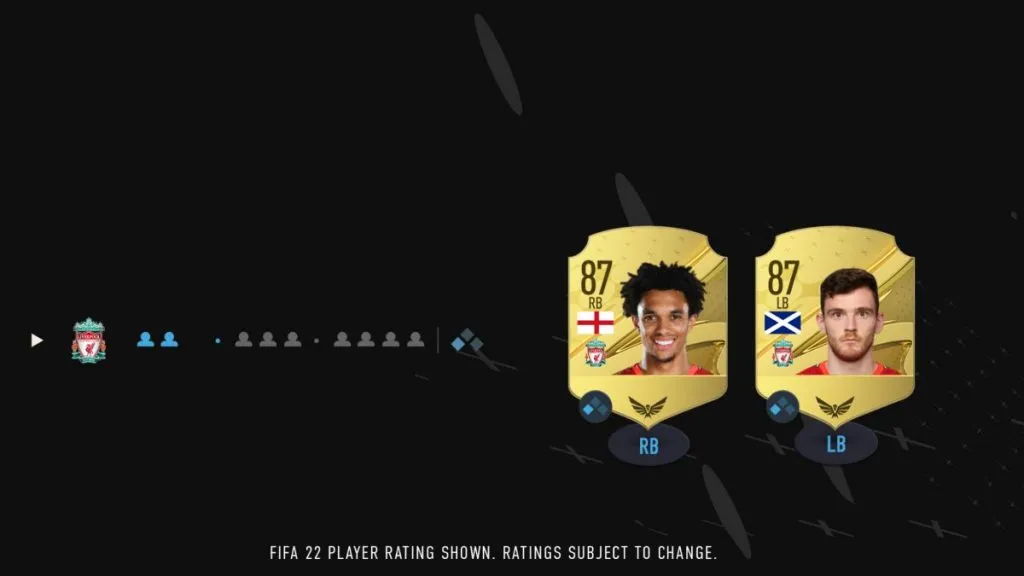
- This means that you’ve successfully increased your Chemistry Threshold for Liverpool players.
- You can follow the same formula for any team, league, and nation.
- Teams will require two players to activate the first threshold.
- Nations & Leagues will require three players each to activate the first threshold.

- To go even further, if you were to add Jurgen Klopp as your Manager, you’d Manager increment for your Premier League chemistry threshold and thus give both Trent- Alexander Arnold and Andrew Robertson a second Chemistry Point.
Read More: FIFA 23 Ratings List – Top 23 Players
How Chemistry Points Are Distrbuted
Here is how much Chemistry you will gain for the Chemistry Threshold depending on how many players you have for each League, Nation, or Club:
| Amount of Chemistry | Club | Nation | League |
|---|---|---|---|
| 1 Chemistry Point | 2 Players | 2 Players | 3 Players |
| 2 Chemistry Points | 4 Players | 5 Players | 5 Players |
| 3 Chemistry Points | 7 Players | 8 Players | 8 Players |
But to make the most of this system, it’s essential that you understand the player’s Preferred Positions and what that means. Without it, your player cannot gain any Chemistry Points from the Chemistry Threshold.
How Do I Find My Player’s Preferred Position in FIFA 23?
To view a player’s Preferred Position and Alternative Position(s), you’ll need to head into Player Details from the FIFA 23 Ultimate Team hub.
To do this, you’ll need to:
- From the FUT main menu, press R1/RB/E until you get to the ‘CLUB’ page.
- Select ‘Squad’ by pressing X/A/Enter.
- From your ‘Squad’ menu, go to the player of your choice and press R3/R/Select with Mouse.
- This will bring up that specific player’s details.
- From here, you’ll simply need to press R1/RB/E once to navigate to Player Details, where the information you’re looking for will be under Preferred Position and Alternative Position(s) if any.
If you’re playing with a controller, there is also a much easier way to see all your starting 11’s positions from the ‘Squad’ menu.
- From the menu, simply flick your right thumbstick to the left once. This will change the card views, and it will display your player’s Preferred Position information at the top of each card.
There are also Preferred Positions that automatically have default Alternative Positions. These are only about the original Preferred Position and will not transfer to a position you changed a player into.

Here are the Default Alternative Positions:
| Preferred Position | Default Alternative Positions |
|---|---|
| RWB | RB |
| RB | RWB |
| LWB | LB |
| LB | LWB |
| CF | ST |
| ST | CF |
| LM | LW |
| RM | RW |
| LW | LM |
| RW | RM |
How To Change a Player’s Preferred Position in FIFA 23
Changing positions in FIFA 23 Ultimate Team, gamers will need to use the Position Modifier consumable on their player.
But, unlike in other years, in FIFA 23, there is only one universal Position Modifier Consumable that you can use to change a player into any of their Alternative Positions.
Another interesting change coming to FIFA 23 is the removal of the RF and LF positions. FIFA stated that too many players were in those positions, but too few formations utilized them.
Because of this, FIFA opted to remove the positions entirely. The few formations that utilized them will now use CF instead.
How to Use Chemistry Style
To apply a Chemistry Style to a player, you’ll need to obtain the consumable of the style you want and apply it to your player through the Squad menu.
Here is how:
- Head to the Squad menu.
- Press Square/X on your player.
- From here, interact with ‘Apply Consumable’
- Navigate to the Chemistry Style section of the menu.
- Click on the Chemistry Style that you wish to apply to your player.
Chemistry Style Changes in FIFA 23
In FIFA 23 Ultimate Team, your player’s Chemistry Style will be directly affected by how many Chemistry Points they have.
- 1 Chemistry Point = Small Boost to Attributes
- 2 Chemistry Points = Medium Boost to Attributes
- 3 Chemistry Points = Full Boost to Attributes
Current Chemistry Styles
These are the current boosts that each Chemistry Style gives. If a Chemistry Style has 2 stats boosted, then they’ll be more potent than a style with 3 stats boosted.
But 3 stats boosted means that your player will get a boost in more areas.
| Chemistry Style | Stats Boosted |
|---|---|
| Basic | Overall small boosts to all stats. Starting style for newly packed players. |
| Sniper | Shooting Physical |
| Finisher | Shooting Dribbling |
| Deadeye | Shooting Passing |
| Marksman | Shooting Dribbling Physical |
| Hawk | Pace Shooting Physical |
| Artist | Passing Dribbling |
| Architect | Passing Physical |
| Powerhouse | Passing Defending |
| Maestro | Shooting Passing Dribbling |
| Engine | Pace Passing Dribbling |
| Sentinel | Defending Physical |
| Guardian | Dribbling Defending |
| Gladiator | Shooting Defending |
| Backbone | Passing Defending Physical |
| Anchor | Pace Defending Physical |
| Hunter | Pace Shooting |
| Catalyst | Pace Passing |
| Shadow | Pace Defending |
| Basic (GK) | Overall small boosts to all stats. Starting style for newly packed players. |
| Wall (GK) | Diving Kicking |
| Shield (GK) | Kicking Reflexes Sprinting |
| Cat (GK) | Reflexes Acceleration Positioning |
| Glove (GK) | Diving Handling Positioning |
There are also cards in FIFA 23 Ultimate Team that can make it a lot easier for gamers to organize their team and its chemistry.
These type of cards include:
- FUT Icons – Match with any club and any league.
- FUT Heroes – Match with an entire league, not just a single club from that league.


