
PS5 Adds 1440p Support - Here's How to Change Your Resolution - Gaming News google.com, pub-1884294887586162, DIRECT, f08c47fec0942fa0
Gaming News
No Result
View All Result
  • Home
  • PC
  • PlayStation
  • Xbox
  • Nintendo
  • Crypto Gaming
  • Reviews
  • Metaverse
  • Videos
  • Home
  • PC
  • PlayStation
  • Xbox
  • Nintendo
  • Crypto Gaming
  • Reviews
  • Metaverse
  • Videos
No Result
View All Result
Gaming News
No Result
View All Result

PS5 Adds 1440p Support – Here’s How to Change Your Resolution

September 7, 2022
in Popular
0 0
0
0
VIEWS
Share on FacebookShare on Twitter


PS5 consoles just got the long-awaited support of 1440p for all users in today’s new patch. Here’s how to take advantage of the feature.

If you don’t have a 4K display but still want a major boost to your PS5’s visual performance, 1440p is the way to go. The resolution is known for being 4 times more detailed than regular HD, and is therefore a massive upgrade for those looking for better visuals.

If you’ve got a 1440p-compatible monitor or TV, you’ll finally be able to take full advantage of the PS5 as of today. Sony’s powerful console can now support native 1440p output, and games with a higher native resolution such as 4K should offer improved anti-aliasing through supersampling down to a 1440p output.

Long story short, this addition will have your PS5 looking better than ever, unless you’re already running 2160p on a 4K monitor.

How to Test if Your Monitor Supports 1440p

  • Boot up your PS5 to its home screen.
  • Nvigate to the Settings gear at the top right of the screen.
  • Select Screen and Video.
  • Then choose Video Output.
  • Under the Resolution and Frequency heading, select Test 1440p Output.
  • Your device will reveal whether or not the connected monitor can support 1440p.
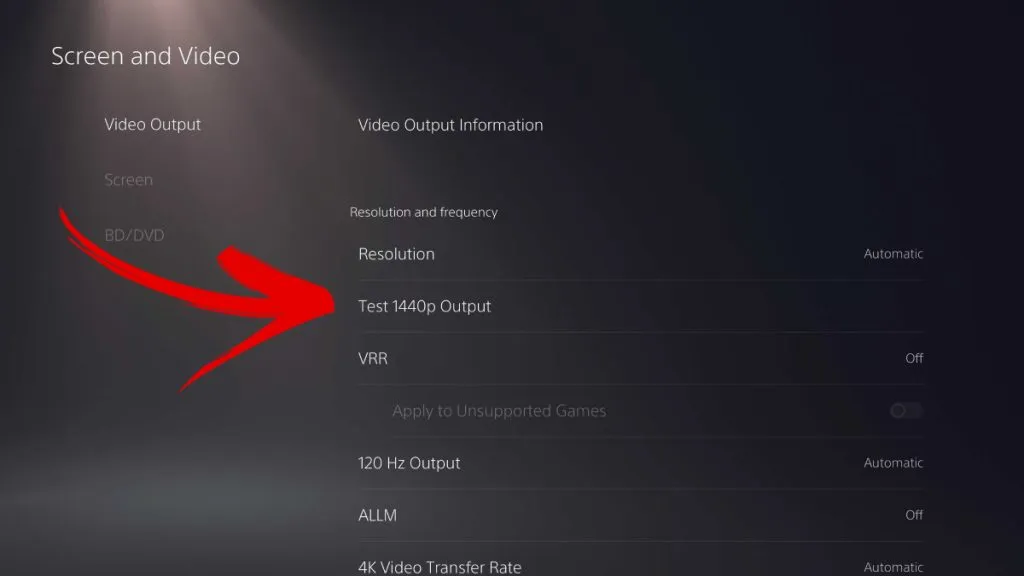
How to Test if Your Monitor Supports 1440p on PS5

How to Change Resolution to 1440p on PS5

  • From the PS5 home screen, head to the Settings gear in the top right.
  • Select Screen and Video.
  • Choose Video Output.
  • Select Resolution, and you’ll be able to select 1440p from the dropdown menu.
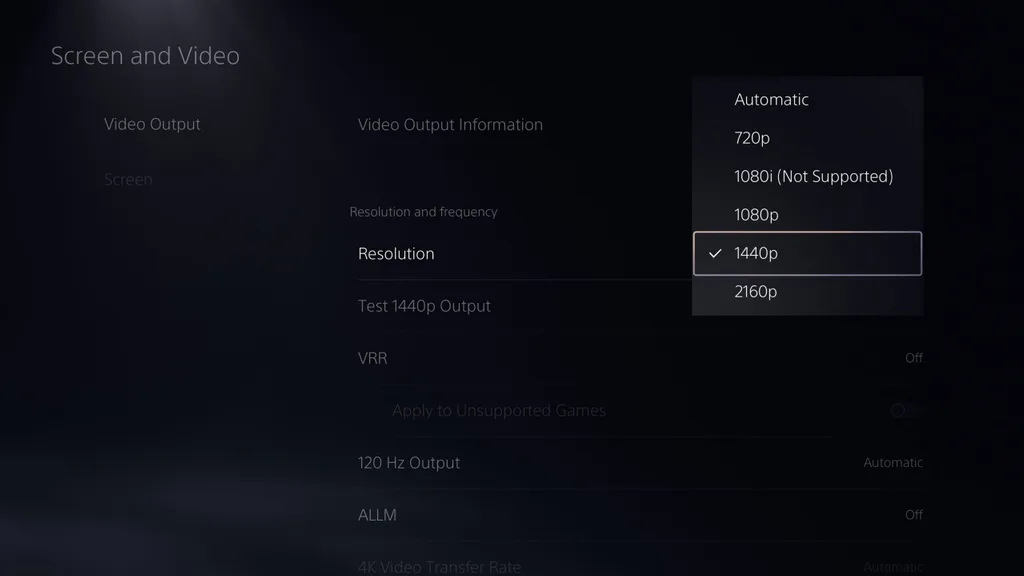
How to Change Resolution to 1440p on PS5

Just like that, you’ve got yourself a 1440p compatible PS5! When God of War Ragnarok’s release date is finally here, you’ll be viewing the Nine Realms in all their glory!

Note: VRR on PS5 currently supports 1080p and 4K, but not 1440p outputs. For those unaware, Vertical Refresh Rate allows your screen to adjust how often it refreshes the image to match the frame rate of your console.

Need more help getting the most out of your console? Here’s our full guide to the PS5, including setup, storage, errors, and more!



Source link

Previous Post

Red Dead Online Finally Receives Substantial Update

Next Post

PlayStation 5 Gray Camouflage Accessories Coming This Fall

Next Post
PlayStation 5 Gray Camouflage Accessories Coming This Fall

PlayStation 5 Gray Camouflage Accessories Coming This Fall

Recommended

Bandai Namco Formally Reveals What’s Subsequent For The Dragon Ball Xenoverse Collection

Bandai Namco Formally Reveals What’s Subsequent For The Dragon Ball Xenoverse Collection

April 20, 2026

Portland Path Blazers vs San Antonio Spurs Apr 19, 2026 Sport Abstract – NBA

April 20, 2026

Classification des substances en pharmacologie sportive

April 20, 2026

Erythropoïétine et Autres Drogues : Dosage et Informations Essentielles

April 20, 2026

Gaming News

Get latest Gaming News on Pley2win.com. Popular Games, New released, Gaming Review, Xbox gaming, PlayStation, PC, Mobile Gaming and More!!

Categories

  • ! Без рубрики
  • 1
  • 10
  • 1000A Z
  • 1090A Z
  • 111
  • 18.12.1
  • 1win-np.com
  • 1xbetapp-ph.com3
  • 2000A Z
  • 44
  • 50%A 50 Z
  • 50%A 50B Z
  • 777casino
  • 8
  • 800A 200BA Z
  • a16z generative ai
  • adobe generative ai 3
  • adobe generative ai 8
  • bahisyasal 4521
  • Blog
  • Bookkeeping
  • BT prod 5715
  • Business, Small Business
  • Casino
  • casinocatspins
  • casinopinco
  • casinowazamba
  • catspinscasino
  • Chicken Road rules
  • chickenroad
  • cresuscasino
  • Crypto Gaming
  • dec_bh_common
  • dec_bh_main
  • dec_pb_common
  • December
  • dushscience.in
  • edeka-halmschlag.de
  • Efbet Jackpots
  • Featured News
  • FinTech
  • Forex News
  • Forex Trading
  • Games
  • Gaming News
  • generative ai adobe photoshop 3
  • ghostinocasino
  • giochi
  • gokspel
  • impressariocasino
  • jan4
  • jeux
  • jeuxi
  • Leon Casino
  • lobby303sky.info
  • madnixcasino
  • Metaverse
  • mostbet
  • NEW
  • New Released
  • News
  • ninecasino
  • Nintendo
  • nko-zdrav.ru
  • nov2
  • nov6
  • novos-casinos
  • Online Casino
  • online καζίνο
  • PC
  • pinco
  • platinumslotscasino
  • PlayStation
  • Plinko Online Casino
  • Popular
  • Post
  • Public
  • ready_text
  • Reviews
  • rubds1010.ru 10
  • sep
  • Sex
  • Sober living
  • spel
  • Spellen
  • spiderbetscasino
  • Spiele
  • spiller1
  • tenexcasino
  • test
  • Trading
  • trends
  • Uncategorized
  • Videos
  • voxcasino
  • vrclub-tron.ru 10
  • vulkanvegascasino
  • what to name your ai
  • wildz
  • wildzcasino
  • www.xin-chao.de
  • Xbox
  • zuplay-in.com2
  • Новости Криптовалют
  • Финтех
  • Форекс Брокеры56

Follow us

  • Home
  • DMCA
  • Disclaimer
  • Privacy Policy
  • Cookie Privacy Policy
  • Terms and Conditions
  • Contact Us

Copyright © 2022 - Pley 2 Win.

No Result
View All Result
  • Home
  • PC
  • PlayStation
  • Xbox
  • Nintendo
  • Crypto Gaming
  • Reviews
  • Metaverse
  • Videos

Copyright © 2022 - Pley 2 Win.

Welcome Back!

Login to your account below

Forgotten Password? Sign Up

Create New Account!

Fill the forms below to register

All fields are required. Log In

Retrieve your password

Please enter your username or email address to reset your password.

Log In
This website uses cookies. By continuing to use this website you are giving consent to cookies being used. Visit our Privacy and Cookie Policy.