Besides being the world’s most-used form of peer-to-peer digital currency, Bitcoin actually contains a useful basic feature: the ability to sign and verify a message
Using your Bitcoin wallet, you can securely encrypt a message by signing it, while the intended recipients can also verify the authenticity of your message. All this is achieved only with the public and private keys of the Bitcoin addresses in your wallet – you don’t even need to have them funded to use this feature (you can have an empty wallet, so to speak).
What’s the usefulness of doing this?
When you sign from your wallet (either to approve a transaction or to sign a message), your digital signature simply proves that you know the private key connected to the public key (the public key being the Bitcoin address that is visible to the public).
Your private key is an extremely large string of numbers that allows you to control your Bitcoin wallet. It is used in cryptocurrency transactions to prove ownership of the public key (or blockchain address). Think of it as a password, except that you can use this private key to create digital signatures that can be easily verified by others without needing to reveal the private key itself.
Let us talk about an example of how this can be very useful to prove your ownership.
UserA wants to send UserB some bitcoin. But UserA will only want to send to UserB’s own wallet, and not someone else’s wallet or to an exchange. So UserB provides BitcoinAddressB and signs it. UserA verifies the signed message, proving that UseB is indeed the owner of BitcoinAddressB.
You can even prove identity with this method, just as Bitcointalk users sometimes do to secure their account against theft, by ‘Staking’ their Bitcoin address with a signed message like in this thread. Here is an example of how people can use signed messages to recover lost accounts.
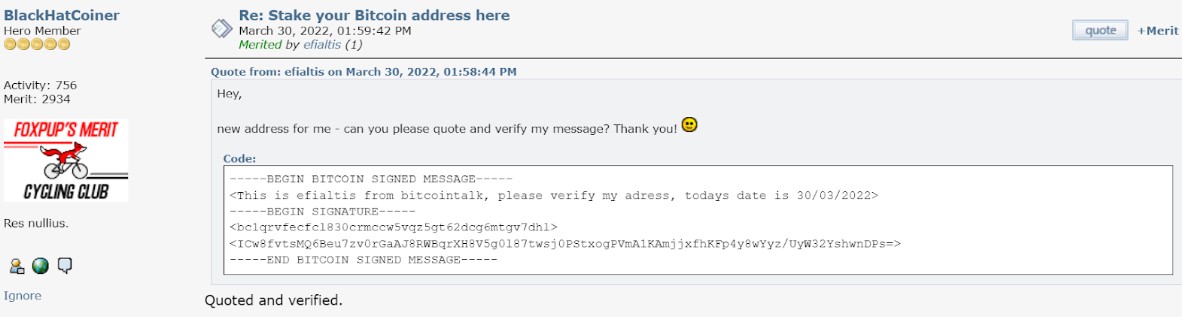
UserC posts a signed message from their Bitcoin address, and it is stored on the forum after being verified by a trustworthy person.
One day, UserC’s Bitcointalk account is hacked and the password changed. UserC then reaches out to the forum admins, signing a message from the same Bitcoin address, proving that they are indeed the rightful owner of the hacked account. The thief now in control of the account will be unable to prove they are the rightful owner, since they don’t own the private key to the Bitcoin address and so, won’t be able to sign messages from it.
UserC’s account password is reset, and his access restored.
Not all Bitcoin wallets are created equal
Before we continue, one note on Bitcoin wallets.
The best way to use Bitcoin is to be the sole controller of your private key. Wallets that let you use Bitcoin like this are sometimes called non-custodial wallets since no one is taking custody of the private keys (except yourself). When used with this type of wallet, you need to specify your transaction parameters (for example, the amount you want to send, the address you want to send it to, the fee you would like to pay, the inputs you would like to use, etc.) and then sign your transactions and broadcast them yourself to the Bitcoin network for validation.
It’s worth mentioning here that not all Bitcoin wallets will grant you access to the private key associated with the wallet. Some may grant it, but not sole access. Typical examples are the wallets of public services like crypto exchanges or even crypto gaming sites like Crypto.Games. When you transact with these wallets, you typically only have access to the public key, which is the publicly visible string of characters usually referred to as ‘Bitcoin addresses’. When you want to send Bitcoin out of these wallets, you actually instruct the site to transact or send on your behalf – so they are the ones signing the transactions and broadcasting them to the Bitcoin network. Since you don’t control the private key, you won’t be able to sign or verify with this type of wallet.
Here are some open source non-custodial wallets that allow you to sign and verify messages. This is not a recommendation to use either or all of them; you should always conduct your own research to determine which wallet suits you best. Also, always self-verify before you download and use any of these wallets!
Great! Now show me how to sign/verify a message with my Bitcoin wallet!
The process to sign and verify messages will vary from wallet to wallet. Generally, you should look for the ‘Sign/Verify’ option from the wallet.
For this example, a standard wallet on Electrum v4.04 is used.
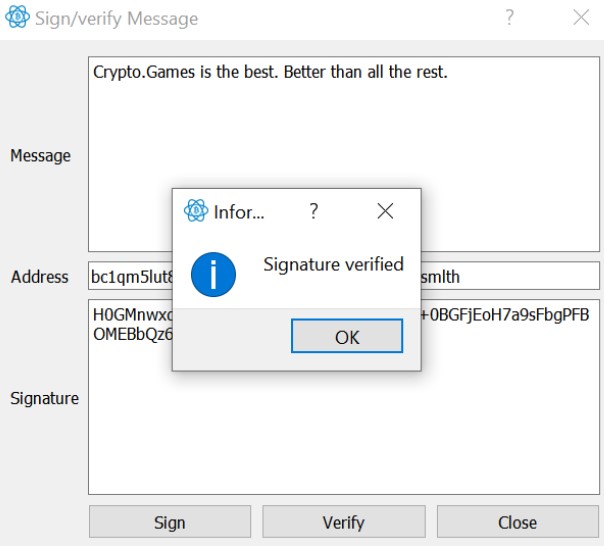
We’ll first sign a message from the address ‘bc1qm5lut8n4zaud84a26nzqymmvnd5sp3uj2smlth’. It must be an address contained in your wallet you want to sign from.
- Open up and sign in to your wallet client (enter your password if you’ve encrypted your wallet. If not, why haven’t you?!).
- From the Addresses tab, right click on the address you want to sign your message with and select Sign/Verify Message. Or, from the top menu bar, select Tools > Sign/Verify Message and enter the address manually into the Address field.

- In the box that pops up, simply Enter your message and when you’re done, click the Sign button. You will then be prompted to enter your password (if you’ve encrypted the wallet).
- When completed, the Signature field should now have a string of characters. That’s your digital signature! In this example, this is what we get: ‘H0GMnwxdhdxtra5djRTHtY0w6hbZMMD2wT+0BGFjEoH7a9sFbgPFBOMEBbQz68hejMj1Rj9oybIVEaxVD+qj+fM=’

- Now, if you give this information to anyone, they can use the same tools to Verify your signed message by entering all this information into the respective fields:
- Message:
Crypto.Games is the best. Better than all the rest. - Address:
bc1qm5lut8n4zaud84a26nzqymmvnd5sp3uj2smlth - Signature:
0GMnwxdhdxtra5djRTHtY0w6hbZMMD2wT+0BGFjEoH7a9sFbgPFBOMEBbQz68hejMj1Rj9oybIVEaxVD+qj+fM=